Starbucks, Uber, Pinterest, Spotify and X all run progressive web apps. For eCommerce the choice comes down to reach versus hardware: a PWA installs from the browser with no app store, costs far less to build and is indexed by Google, while a native app still wins on deep hardware access and the last few percent of iOS polish.
This guide compares responsive websites, native apps and PWAs side by side, explains what actually makes a PWA work, and walks through the numbers three retailers reported. It also covers the limits, which most PWA write-ups skip, and what changes now that your storefront has to be readable by AI answer engines as well as browsers.

Responsive website vs native app vs Progressive Web App (PWA)
There are three ways to reach a customer on a phone: a responsive website, a native app, or a progressive web app. Most eCommerce businesses end up with some combination of the three, and the decision tends to be made once and then lived with for years, so it is worth understanding what each one gives up.
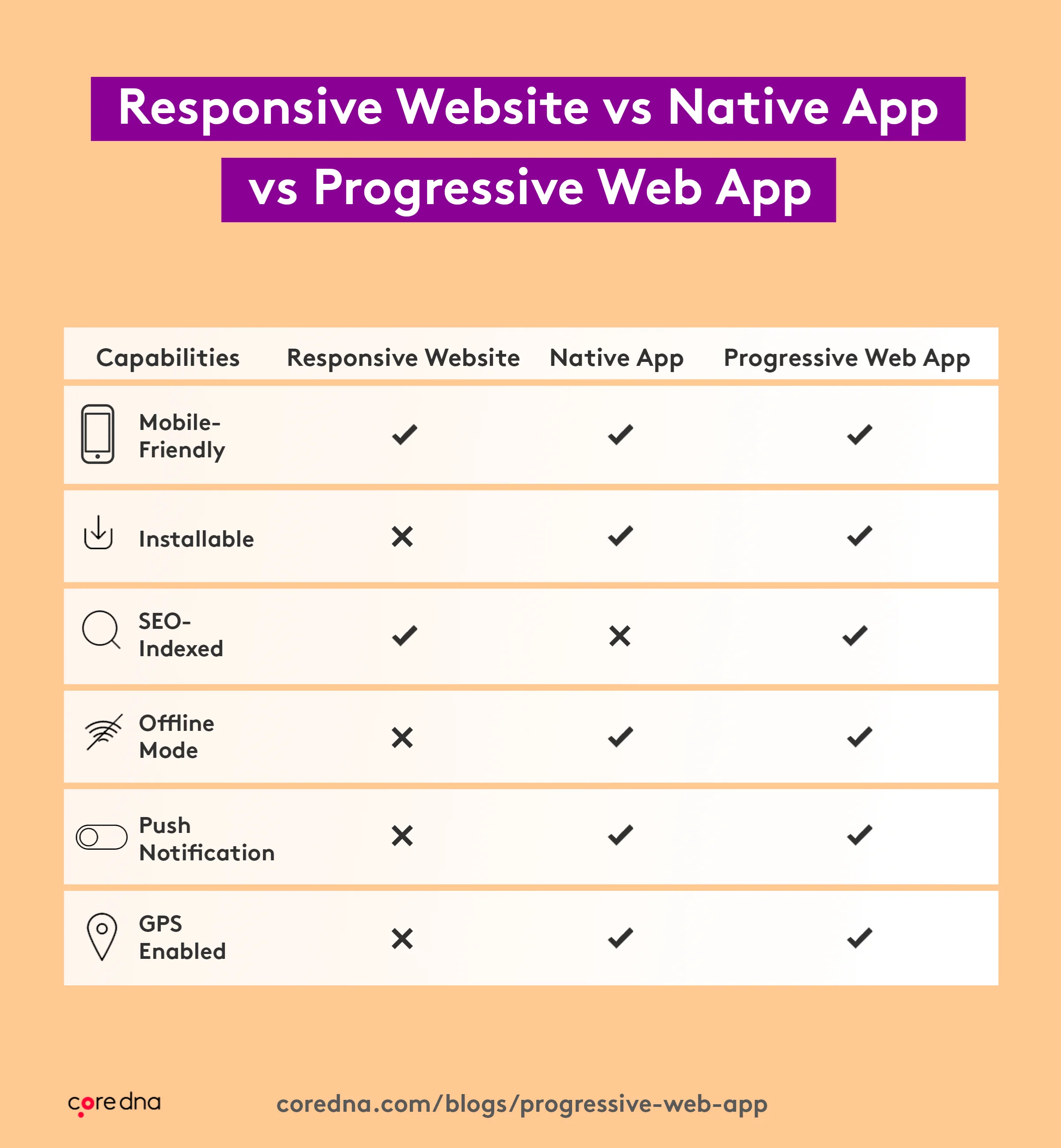
The chart below sets out the main differences.
1. Responsive websites
A responsive website changes its layout to suit the device it is viewed on. It was the first serious answer to mobile and it is still the right answer for a great deal of content: easy to share, quick to load, reachable from any platform, and fully indexed by search engines.
What it cannot do is behave like an app. There is no home screen icon and no offline mode, so a customer on a patchy connection gets an error page rather than a cached one.
2. Native apps
A native app is built for one operating system, in that platform’s own language: Swift for iOS, Kotlin or Java for Android. Cross-platform tools such as React Native and Flutter let you share most of a codebase, at the cost of some platform polish.
Native remains the strongest option for deep hardware access, background processing and the smoothest possible interactions. The price is time and overhead. There are two builds to maintain, an app store review before every release, and a customer who has to be persuaded to install something before they can see anything at all.
3. Progressive web apps
A progressive web app is your website with a set of browser capabilities switched on. It can be installed to the home screen, cached for offline use and, on most platforms, send push notifications, with no app store in the middle. The technologies are the ones your front-end developers already use, which is why a PWA is usually an upgrade to an existing site rather than a separate project.
If you are weighing this up as part of a wider front-end decision, we cover the options in choosing an eCommerce web development approach, and the case for a single-page front end in when to consider single page applications.
So What Exactly is a Progressive Web App (PWA)?
A progressive web app is a website that behaves like an installed app. It runs in the browser, so there is nothing to download from the App Store or Google Play, and the same URL works whether the visitor has installed it or not.
The point of the technology is to survive bad conditions. Caching means the interface still loads on a weak connection, and the parts of the experience that do not need the network keep working when there is none at all. On a slow connection that is often the difference between a browsing session and an abandonment.
You have almost certainly used several without noticing. Starbucks lets customers browse the full menu and build an order offline. Uber loads a bookable ride on low-end devices and poor networks. Pinterest, Spotify and X all ship one. Among retailers, Flipkart and AliExpress were the early adopters and remain the most cited.
What all of these have in common is that none of them asks the visitor to commit before seeing any value. The site loads, it works, and installing it becomes an option rather than a toll gate. For a retailer that removes the single largest drop-off in the mobile app funnel, which is the install step itself.
What makes a progressive web app?
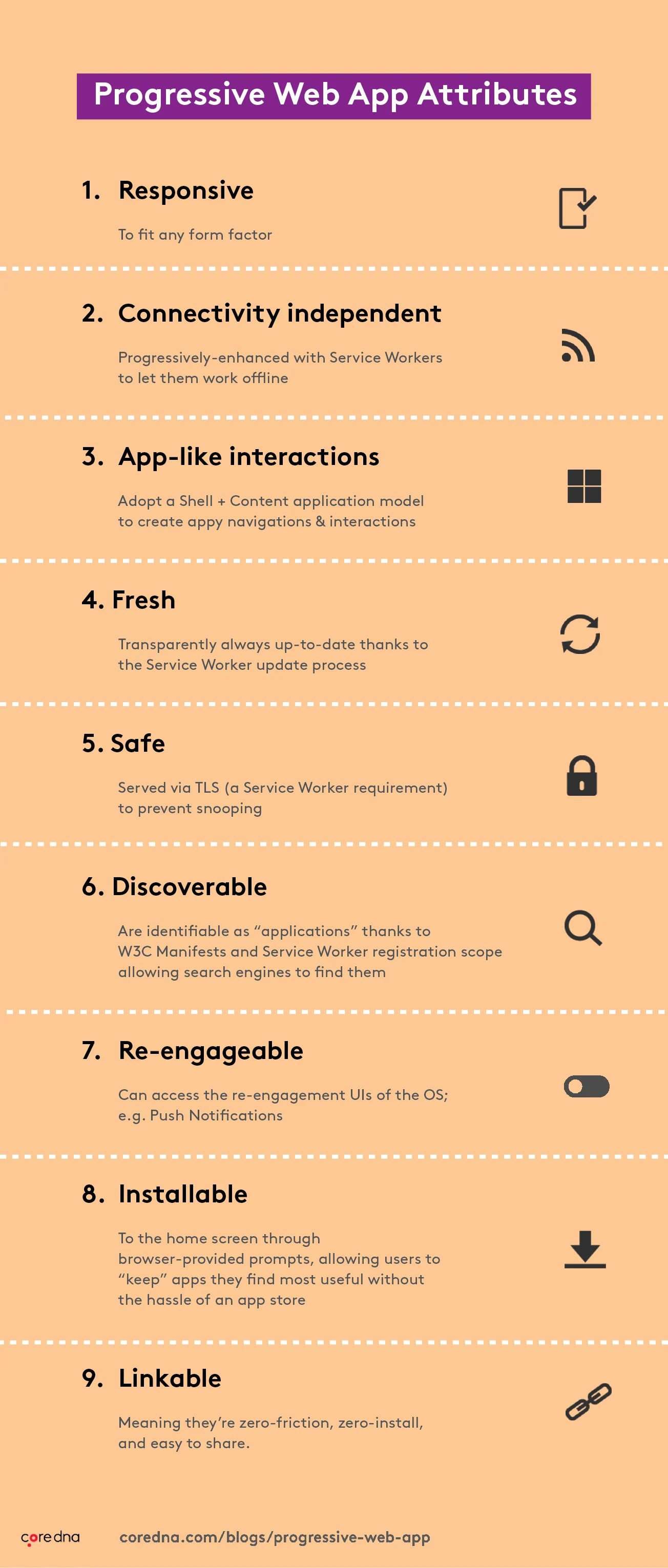
The term was coined in 2015 by Alex Russell and Frances Berriman, who set out the attributes of what they saw as a new class of application built on the growing capability of browsers. The list has held up well, and it is still the clearest description of what separates a PWA from a merely mobile-friendly website:
- Responsive: fits any form factor.
- Connectivity independent: enhanced with service workers so it works offline.
- App-like interactions: a shell and content model, so navigation feels native rather than like page loads.
- Fresh: always up to date, through the service worker update process.
- Safe: served over TLS, which service workers require anyway.
- Discoverable: identifiable as an application through a W3C manifest, so search engines can find it.
- Re-engageable: can use the operating system’s own re-engagement channels, such as push notifications.
- Installable: added to the home screen through a browser prompt, with no app store involved.
- Linkable: shareable by URL, with nothing to install first.
How does a Progressive Web App (PWA) work?
Three things turn an ordinary website into an installable app.
1. Web manifest
The web manifest is a JSON file that tells the device how the app should present itself once installed: the name, the home screen icon, the theme colours, the screen orientation and the URL it opens at. Without one, the browser has nothing to install.
2. Service worker
A service worker is JavaScript that runs in the background, separately from the page. Its main job is caching. After the first visit it stores critical assets such as HTML, CSS and images, so the next load comes from the device rather than the network. Service workers also handle push notifications and background sync, which is what makes an offline shopping cart possible.
3. HTTPS
Service workers only run over a secure connection, so a valid TLS certificate is a hard requirement rather than a recommendation. That is no burden for an eCommerce site, which needs one anyway to handle payment and customer data, but it does rule out serving a PWA from anything unencrypted.
8 benefits of progressive web apps
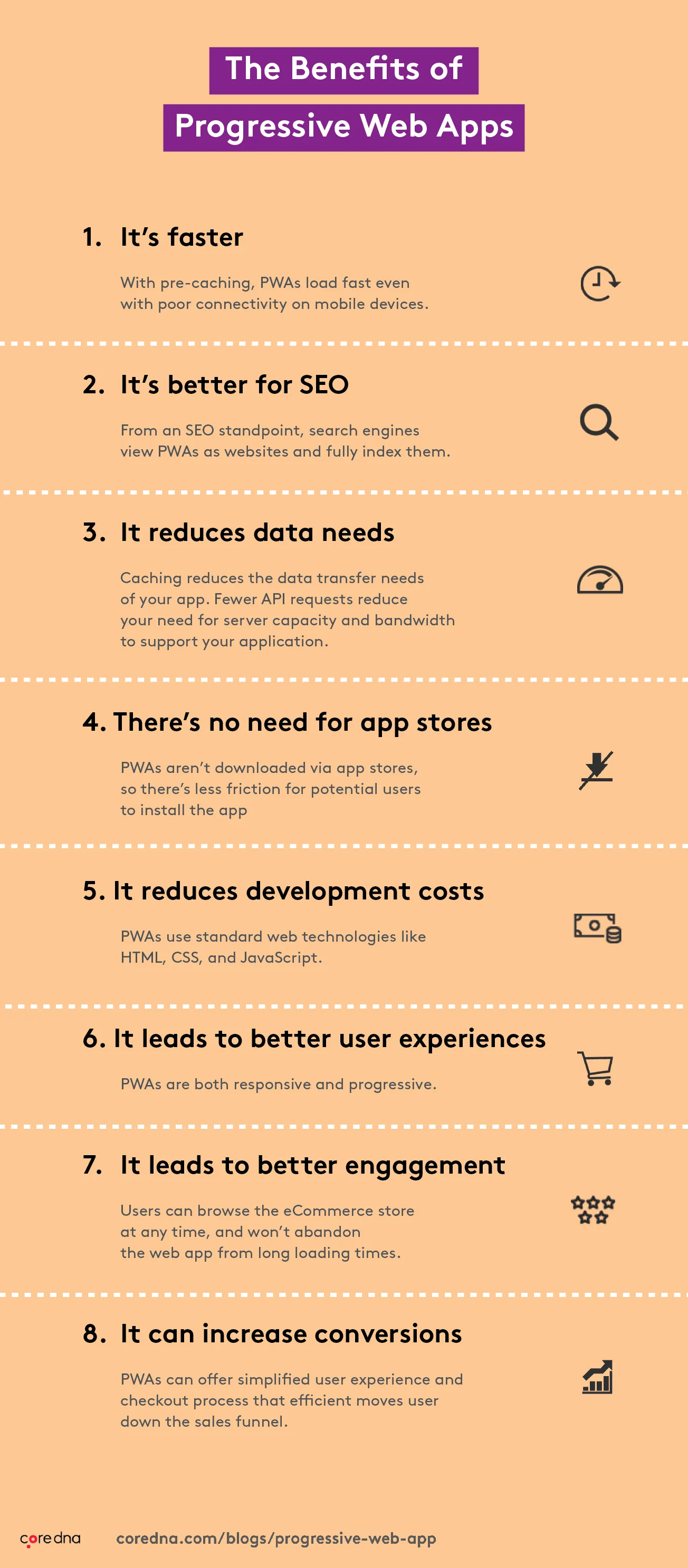
Moving to a PWA takes development work, but the returns are concentrated in the places eCommerce teams care about most: speed, cost, and the number of people who can reach you without being asked to install anything first.
1. It is faster
Pre-caching means a PWA loads quickly even on a poor mobile connection, because the shell of the interface comes from the device rather than the network. Speed is also a ranking input through Core Web Vitals, so the gain shows up in search as well as in the session.
2. It is better for SEO
Search engines treat a PWA as a website and index it normally. A native app is not indexed and contributes nothing to your organic visibility. The same now applies to AI answer engines, which read pages rather than app stores, so a PWA can be cited in an answer where an app listing cannot.
3. It reduces data use
Caching cuts the number of requests, which reduces both your bandwidth costs and your customer’s mobile data use. PWAs also take up far less storage than a native app, which matters more than it sounds on a phone that is nearly full.
4. There is no app store in the way
This is the largest structural advantage. No review queue, no separate iOS and Android submissions, and no install step standing between a visitor and your catalogue. Anyone already on your site can install the app at the moment they decide they want it.
5. It reduces development cost
Native apps need separate stacks and often separate teams. A PWA uses HTML, CSS and JavaScript, which your front-end developers already know, and it is usually an addition to an existing site rather than a new build. Updates ship immediately, with no release approval from Apple or Google.
6. It works on more devices
A PWA is both responsive and progressively enhanced. It adapts to the screen it is on, and it starts from core content and features, layering on more advanced capabilities only where the browser and connection support them. Nobody gets a broken page because their device is old.
7. It leads to better engagement
Offline caching means a customer can browse whenever they want rather than only when the network cooperates, and push notifications give you a channel back to them that does not depend on email deliverability. Both raise return visits.
8. It can increase conversions
The retailers who published results saw substantial conversion improvements, covered in the case studies below. The mechanism is not complicated: fewer steps to reach the catalogue, fewer abandonments from slow loading, and a shorter path through checkout.
Five ways a PWA improves the mobile shopping experience
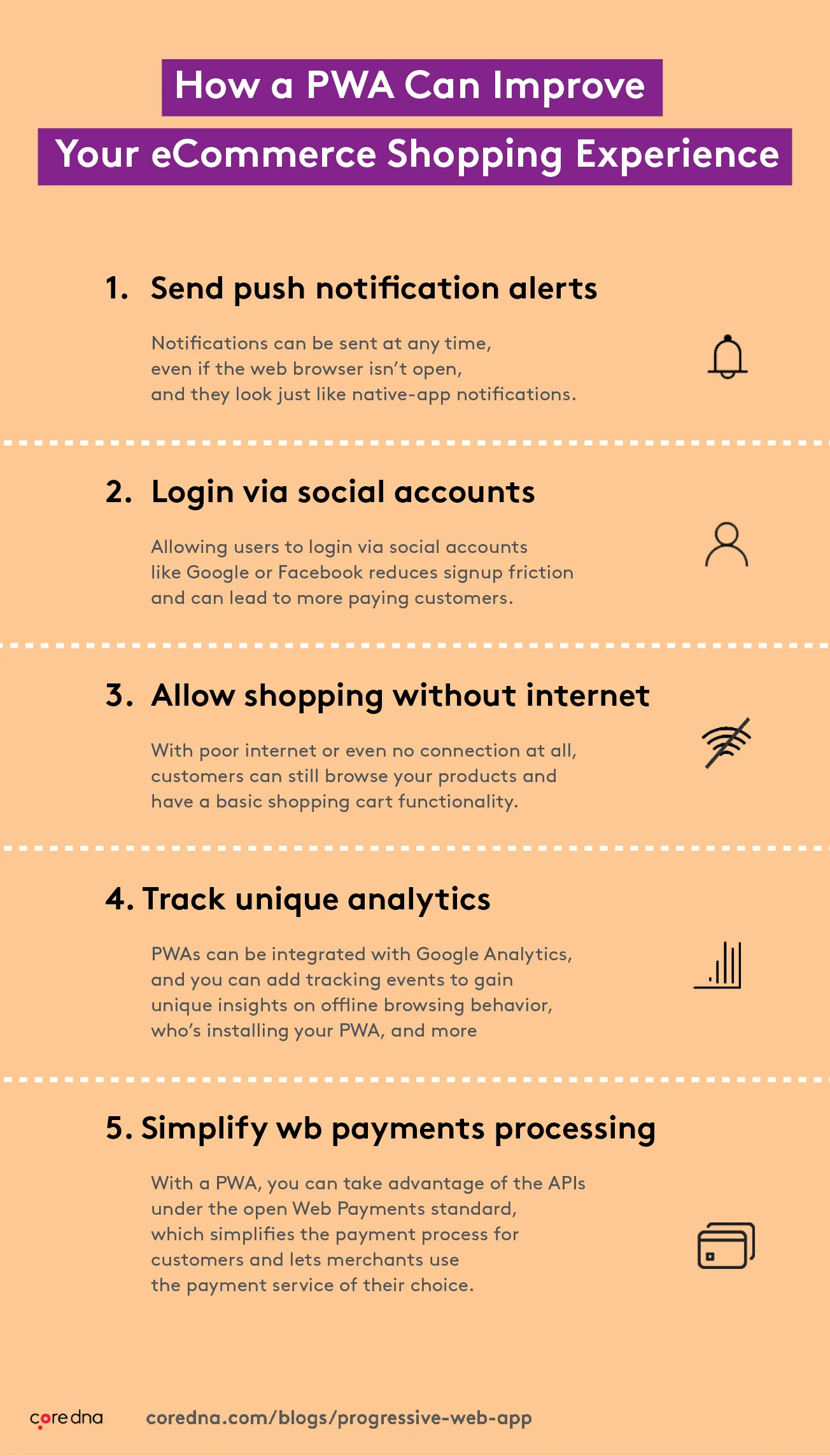
1. Push notifications
Once a customer opts in, a PWA can send notifications even when the browser is closed, which gives you a direct channel for restock alerts, price drops and abandoned cart reminders. Support is broad, although on iOS the customer has to add the app to their home screen first.
2. Social sign-in
Letting customers sign in with an existing Google or Apple account removes the most abandoned step in any mobile checkout, which is creating a password on a phone. Fewer fields, more completed registrations.
3. Shopping without a connection
Cached product data means a customer can keep browsing on a train or in a basement, and add items to a cart that syncs when the connection returns. The alternative is an error page and a lost session.
4. Analytics that survive being offline
Offline behaviour is invisible by default. A service worker can queue events and send them once connectivity returns, so you can see what people did while disconnected, and how many of them installed the app.
5. More choice in payments
Inside a native iOS app, Apple controls in-app purchasing and takes a fee on it. A PWA is a website, so you can use the open Web Payments standard and the provider you actually chose. That is also what makes it practical to run one checkout across every market and method rather than one per platform.
Search is the other place mobile sessions are won or lost. A slow or literal-minded search box is worse on a phone than anywhere else, which is why AI enterprise search often moves mobile conversion more than any single PWA feature does.
PWA case studies, and where PWAs fall short
Three retailers published detailed results, and their numbers are still the most quoted in the category. They are also old. Read them as evidence that the approach works rather than as a projection of what you would get today.
1. Debenhams: 40% increase in mobile revenue
Debenhams was a large British department store chain with a mobile problem. Most of its online traffic was on phones and very little of it converted. It became the first UK retailer to invest in a PWA, cut the time from browsing to purchase substantially, and reported a 40% increase in mobile revenue alongside a 20% increase in overall conversions. For context, this was 2017. Debenhams closed its physical stores in 2021 and now trades online only, which does not invalidate the result but does date it.
2. AliExpress: 104% more new users
AliExpress had a fast native app that was expensive to get installed. Its PWA made the mobile experience reachable without an install, and the company reported 104% more new users across browsers and an 84% increase in conversion among iOS visitors. Those two figures measure different things and are often quoted interchangeably, which is worth knowing if you see them cited elsewhere.
3. Flipkart: 40% higher re-engagement
Flipkart, India’s largest online retailer, had gone app-only and found it was losing customers who would not install. Flipkart Lite, its PWA, delivered a 70% higher conversion rate among visitors who installed it and a 40% higher re-engagement rate. Flipkart has since folded Lite back into its main experience, but it remains the clearest example of a retailer reversing an app-only decision.
Where PWAs fall short
Most articles on this subject are published by companies that build PWAs, so the limitations tend to go missing. They matter:
- iOS is the weak spot. Installation is less discoverable than on Android, and push notifications require the customer to add the app to their home screen first. If a large share of your revenue comes from iPhone traffic, test this properly before committing.
- Hardware access is limited. Bluetooth, advanced camera control, background location and similar capabilities are either unavailable or inconsistent between browsers. If your experience depends on one of them, native is still the answer.
- No app store presence. Not having to deal with app stores also means not appearing in them. For a brand whose customers search the App Store by name, that is a real discovery channel to give up.
- It is not free. Retrofitting caching, offline states and an install prompt onto an existing storefront is real engineering work, and the offline experience in particular has to be designed rather than switched on.
What has changed since 2018: one content source, many surfaces
The original PWA argument was about phones. The 2026 version is broader. The same product content now has to serve a browser, an installed PWA, a marketplace listing, and the AI answer engines and agents that increasingly summarise your catalogue before a customer reaches your site at all. Building a separate front end for each is how teams end up maintaining four versions of the truth.
That is an argument for holding content and commerce data in one place and serving it through APIs to whatever front end needs it. A headless architecture is what makes a PWA straightforward to build in the first place, because the front end becomes one more consumer of the same data everything else already uses. Core dna is framework agnostic on the front end for exactly this reason, so a PWA becomes an additional surface rather than a separate project.
The newer part of this is machine access. Core dna exposes the platform to AI assistants through an MCP server, so catalogue and content changes can be made by an agent rather than by hand, and agentic workflows can push one change across every property at once. For a multi-property operator that is the difference between updating one storefront and updating forty. We look at where this is heading in the digital trends that matter in 2026.
So which should you build?
For most eCommerce teams, start with the PWA. It costs less, it reaches everyone who lands on your site, it earns organic traffic, and it can be cited by AI answer engines. Add a native app afterwards, and only when a specific hardware requirement or a genuine retention case justifies maintaining a second codebase. Building native first and treating mobile web as an afterthought is the decision all three retailers above had to reverse.

Yes, Core dna is can be used as headless or as a decoupled platform and by essence is fully responsive.
A responsive platform like Core dna is a great tool for developers who want to create responsive websites. It is easy to use and provides a wide range of options for how your website can respond to different screen sizes.
Experience
The Core dna platform is the product of a decade of experience in web solutions. Capitalize on our expertise across a variety of industries and leverage our reputation for excellence in web solutions by offering your clients the benefits of a trusted brand. Core dna Partners instill confidence in the solutions they provide through our reliable platform that evolves with the online environment and adapts to their changing needs.
Core dna is framework agnostic.
An agnostic framework means you can create any design using the front-end technology and frameworks that you know and love.
Summarize with