Save a Life delivers CPR, BLS and certification training online. When it first came to Core dna, its content ran on WordPress, its courses on a standalone LMS and its sales on a separate eCommerce system. It had also spent more than a year trying to build its own LMS to fit its certification rules.
Save a Life asked whether Core dna could run the LMS on the same platform as its website and store. Core dna built a proof of concept in a week and a half, using custom entities and the admin, with no separate LMS product. That build became the custom LMS Save a Life runs today, alongside its website and checkout on the Core dna LMS and eCommerce platform.
This article covers how the LMS was built, what runs on it today, and every LMS feature Core dna offers.
Why Did Save a Life Need a Custom LMS?
Save a Life's courses don't fit a standard LMS:
- Each course is sold several ways: a first certification, a recertification, a “for life” option and bundles.
- Some courses issue more than one certificate, such as a CME certificate and a provider card that expires after two years.
- Learners stop and resume on different devices, so progress has to be saved on the server.
- Employers and institutions buy training for their staff.
- Courses, exams and checkout run in English and Spanish, with prices in several currencies.
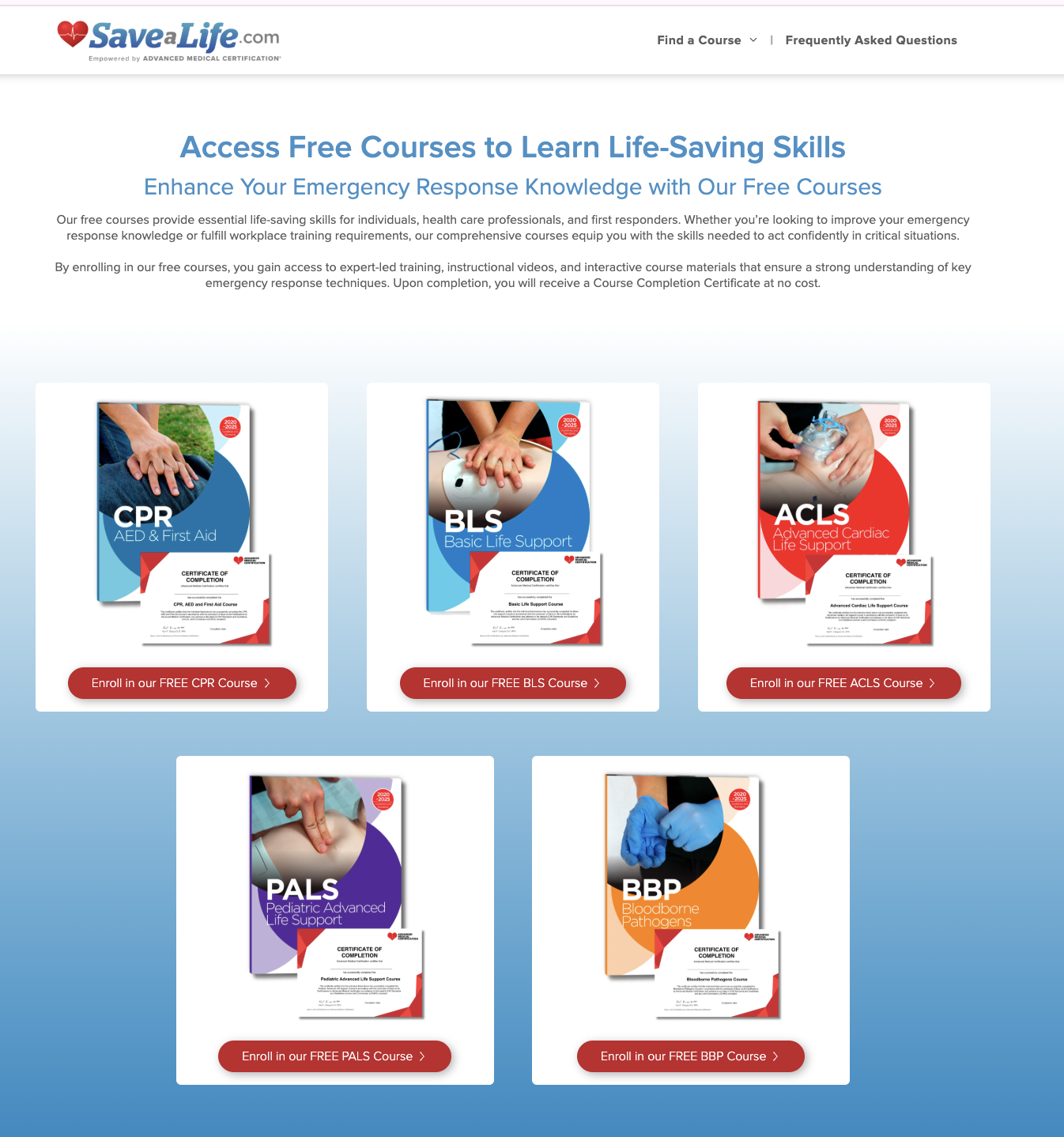
Its previous setup split this across WordPress, a standalone LMS and a separate store, so learner data sat in three places. Read how Save a Life replaced three systems with one platform.
How Was the LMS Built on Core dna?
Core dna is a platform, not a fixed LMS product. The team modeled Save a Life's LMS with custom entities, the content types an admin defines with their own fields and relationships, and connected them in the admin:
- Courses, each with its own settings, pass conditions and certificate template.
- Books, the learning content for each course, organized into units and lesson pages.
- Test banks and questions, linked to courses, with scenarios, multiple-choice answers and feedback for each question.
- Enrollments, created when a learner buys a course, holding progress, scores, pass dates and certificates.
- Orders, which link each purchase to the courses it gives access to.
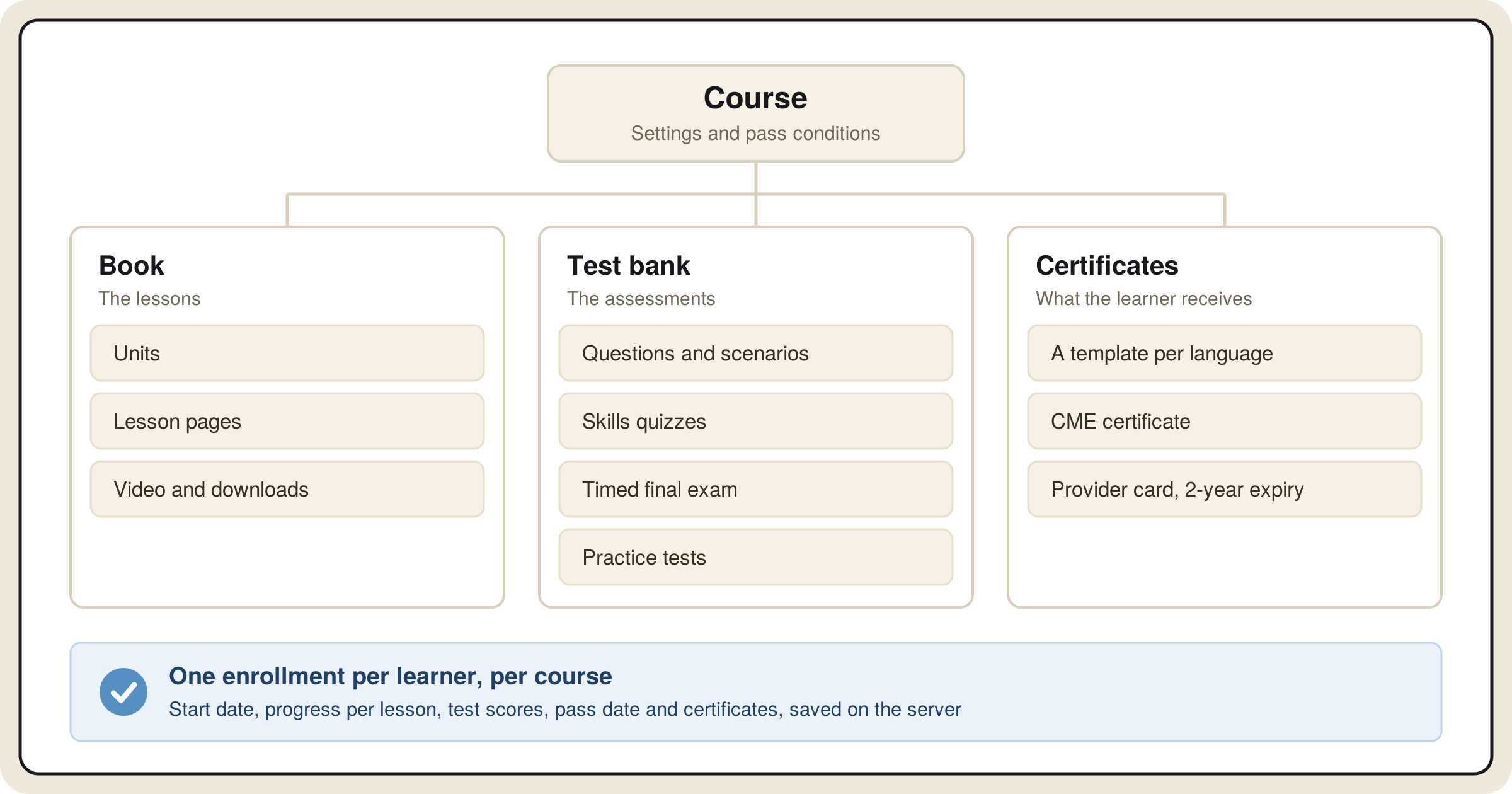
Automation jobs handle the steps around them: welcome emails, pass and fail emails, certificates, reports and updates to the CRM. Front-end templates give the course pages, lessons and learner dashboard Save a Life's design.
The video shows how a custom entity is set up: define the fields, save, and the new content type is ready to use across the site. A field added later, such as credit hours, is available everywhere the course appears.
What Does the Learner Journey Look Like?
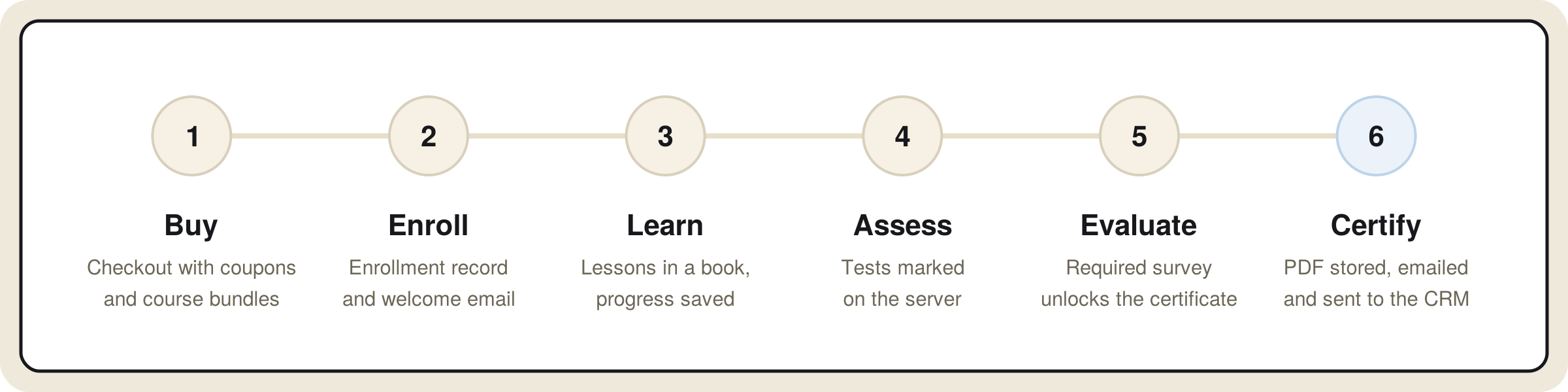
- Buy. A single-page checkout with card payments, Apple Pay and Google Pay, coupons and course bundles. A guest checkout creates the learner's account.
- Enroll. The order creates an enrollment record and sends a welcome email.
- Learn. Lessons sit in a book, and progress is saved per lesson, so learners can stop and resume on any device.
- Assess. Skills tests and a timed final exam, marked on the server against the pass mark for each test.
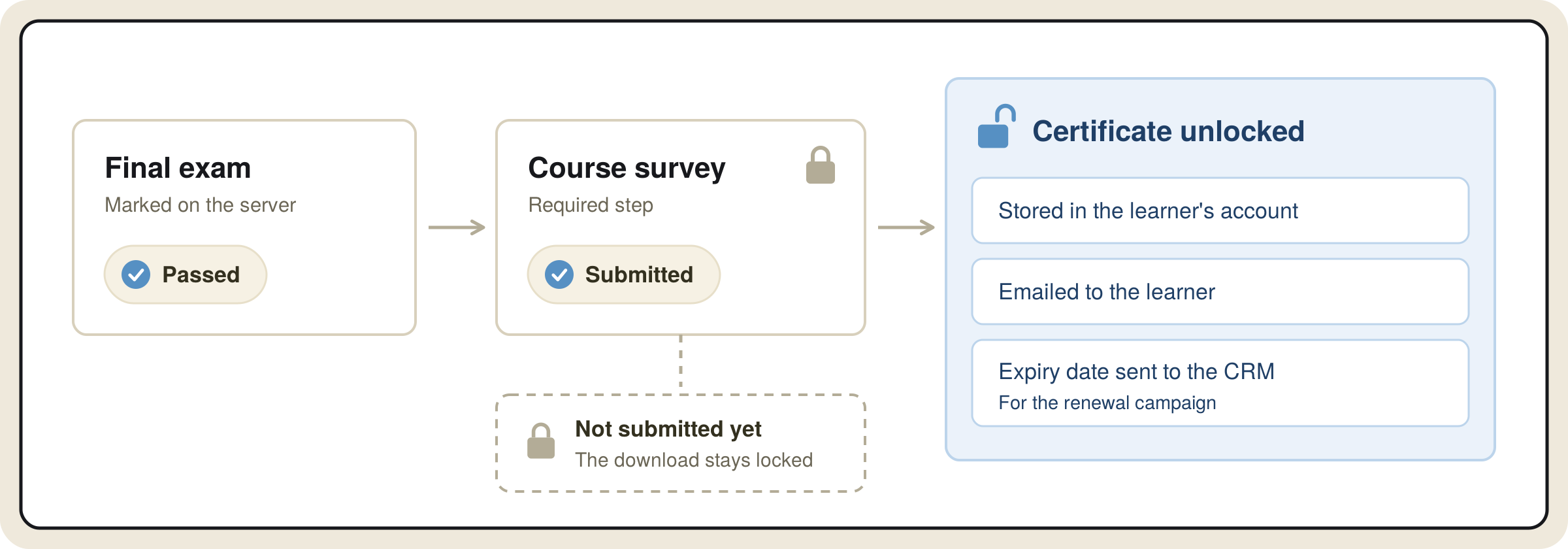
- Evaluate. A required survey unlocks the certificate download.
- Certify. The PDF certificate is stored against the enrollment and emailed to the learner, and the certification and expiry dates are sent to the CRM.
What Does Save a Life Run on the LMS Today?
Assessments. Question banks with scenarios, answer shuffling and feedback per question. Three test types: skills quizzes, timed final exams and public practice tests with instant feedback. Every attempt is marked on the server, so a learner can't alter a result in the browser, and a question can be corrected in bulk after it goes live. Retakes come with pass and fail emails in the learner's language.
Certificates. Each course has its own PDF template, with a version per language that prints non-English names correctly. One course can issue several certificate types, such as a CME certificate and a provider card with a 2-year expiry. Learners download their certificates from their account at any time, and requests for a printed card go to the fulfillment team.
Evaluations. A learner survey is a required step. The certificate download stays locked until the learner submits it, and the responses can be passed to other business tools.
Selling courses. Each course is sold as a first certification, a recertification, a “for life” option and part of bundles, all drawing on the same course. Automatic discounts, coupon codes, abandoned-cart emails and several currencies with automatic exchange rates run in the same checkout, and a refund also removes course access. Read how one course sits behind four products.
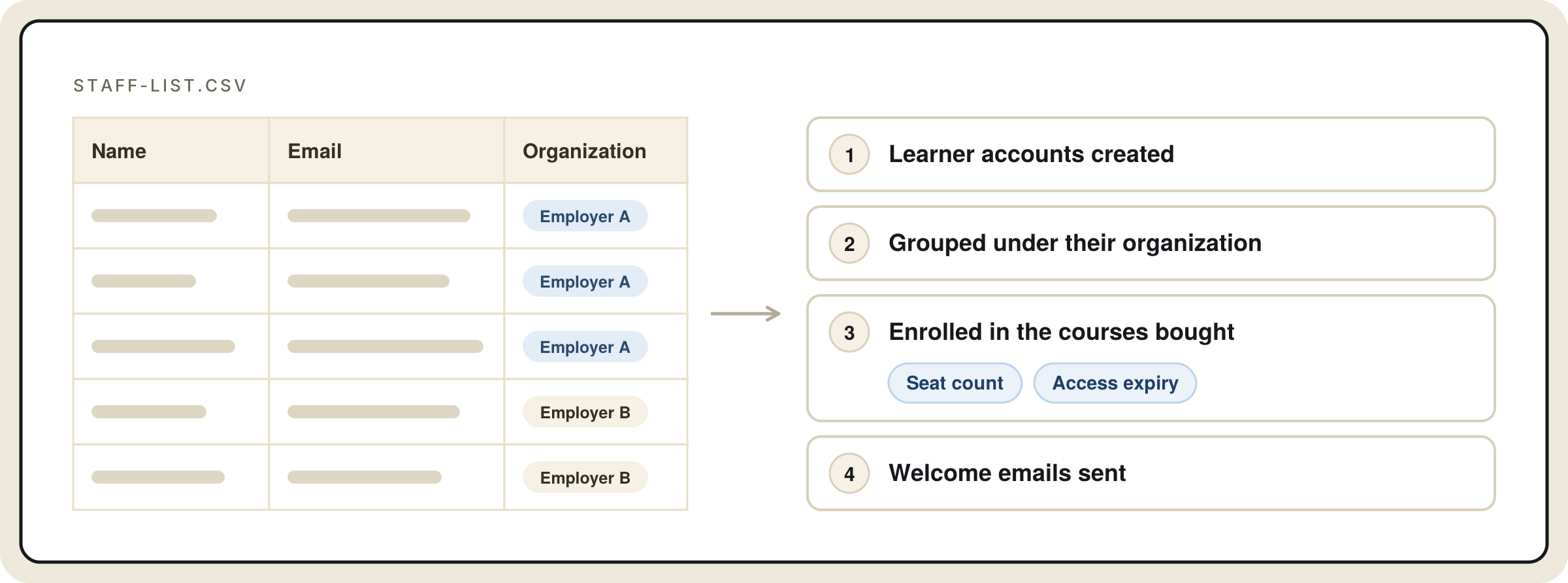
Training for organizations. Staff lists are imported from a spreadsheet, which creates their accounts, groups them under their organization, enrolls them in the courses bought and sends welcome emails. Each course in an order carries a seat count and an access expiry date, and group and student discount requests go to the sales team.
Reporting and CRM. Enrollment exports by date range list each learner's start date, pass date, score and certificate links. Certification and expiry dates go to the CRM to drive renewal campaigns, and purchases and completions are tracked in Google Analytics.
Languages and sites. Course pages, exams, emails and checkout run in English and Spanish, and several branded sites run from the same platform. Read how Save a Life localized about 1,700 pages into Spanish.
LMS Features on Core dna
Every feature below runs on Core dna, for Save a Life, YMCA Ignite or other programs, and each one can be set up for a new program with the same tools.
Course delivery
- Courses built from books, units and lesson pages in the Core dna admin
- A SCORM 1.2 player with resume, bookmarks and progress saving, plus SCORM 2004 and xAPI
- Module curriculums that unlock in order
- Live webinars with a calendar invite, and on-demand recordings
- Free courses with lead capture and a shareable completion page
- Downloadable course materials
- Content for visitors, with extra content shown only to enrolled learners
- Course prerequisites shown before purchase
Assessments and certificates
- Question banks, timed exams, quizzes and practice tests
- Server-side marking and a pass mark per test
- Random questions drawn from a larger pool, attempt limits and waiting periods between attempts
- Pass and fail emails in each learner's language
- PDF certificates from your own template, stored and downloadable at any time
- Several certificate types per course, with expiry dates
- Certificate emails to the learner and to an employer
- A survey required before the certificate unlocks
- Credit hours, accreditation statements, certificate numbers and a public verification page
Selling and enrollment
- Single-page checkout with cards, Apple Pay and Google Pay, or Stripe with Stripe Tax
- Coupon codes, course bundles and automatic discounts
- Guest checkout that creates the learner account
- Receipts, invoices and refund emails, with refunds removing course access
- Abandoned-cart emails
- Several currencies with automatic exchange rates
- Seat counts and access expiry per course
- Subscriptions and memberships with recurring billing
Learner experience
- A learner dashboard with active courses, progress, scores and certificates
- Account pages for orders, downloads, details and addresses
- Course pages in several languages, with a language switcher
- Live chat with the support team
- Course reviews and ratings
Administration, reporting and integrations
- Enrollment, product and learner exports to CSV
- Weekly and monthly reports emailed to a list of recipients
- Bulk import of staff with organization groups and enrollments
- Import of learners and their history from a previous LMS
- CRM sync of purchase, certification and expiry data
- Google Analytics and Tag Manager events for purchases and completions
- Several branded sites from one platform
- An organization manager portal and single sign-on
See how these fit together on the Core dna LMS and eCommerce platform page.
Courses Built in Core dna or SCORM Packages?
Save a Life builds every course inside Core dna. YMCA Ignite works the other way: its instructional designers build courses in authoring tools such as Articulate Rise or Storyline, and Core dna sells, plays and tracks the SCORM packages.
| Built in Core dna (Save a Life) | SCORM packages (YMCA Ignite) | |
|---|---|---|
| Who edits content | Your team, in the Core dna admin | Instructional designers, in the authoring tool |
| Updating a course | Edit a page, and the change is live | Upload a new version; completions are kept |
| Assessments | Core dna test banks, marked on the server | Built into the package, with the result stored in Core dna |
| Tracking detail | Per lesson, per test and per question | SCORM status, score, time and bookmark |
| Languages | Linked language versions of each course | One package per language |
| Search | Course and practice test pages can rank in Google | Content sits inside the player |
| Best for | Content you want to own, edit and grow | An existing SCORM library or an external design team |
Both use the same enrollment, certificate and reporting records, so one site can offer both kinds of course. If your courses are SCORM packages, see what to check before you choose a SCORM LMS.
Questions to Answer Before Building a Custom LMS
- Do you sell your courses? If courses are a revenue line, check whether checkout, coupons, bundles, refunds and course access sit in the same system as the LMS.
- What do your certificates need? List each certificate type, its expiry, the credit hours and accreditation wording, and what has to happen before it's issued.
- Who buys for groups? If employers or institutions buy seats, decide how staff are enrolled, how seats and expiry are tracked and what each organization can report on.
- Will you build courses or upload SCORM? The answer decides who edits content and how much tracking detail you get.
- Which languages and currencies? Each one affects course pages, exams, emails, certificates and checkout.
- What has to move across? Learner accounts, enrollments, completions and certificates from your current LMS, plus redirects for the pages that bring in traffic.
For the full selection process, from mapping your systems to comparing total cost and running demos, see how to choose an LMS. For a wider comparison, see six LMS platforms for training customers, members and partners.
Yes. SCORM and HTML5 packages run inside the course structure, and a learner who closes a course picks up near where they stopped. YMCA Ignite runs its SCORM courses on Core dna after moving them from Absorb. Courses can also be authored in the platform as lessons, question banks and assessments, which makes credit types, versions and certificate rules reportable. The choice is made per catalog during discovery.
Yes. Recertification can be sold as its own product on the same course. Each renewal creates a new enrolment with its own exam attempt and certificate, and earlier certificates stay in the learner's account. Save a Life sells each course as a first certification, a recertification, a for-life product and part of a bundle.
Yes. Accredited courses can issue a separate continuing education certificate alongside the completion certificate, and credits can be sold as their own product. Advanced Medical Certification sells CME credits on its ACLS practice test course.
Yes. Members, orders, enrolments, completions and certificate records are mapped to Core dna, trial-migrated into staging and reconciled against the source before launch. Historical certificates can be regenerated from the migrated records, and redirects keep existing pages and rankings in place. Save a Life moved from WordPress, a standalone LMS and a separate store, and YMCA Ignite moved its SCORM courses and learners from Absorb.
Summarize with