If your organization trains people, you are likely using or considering a learning management system (LMS). According to the 2026 Training Industry Report, LMS usage is at 92%, up from 89% the year before, with 24% of training budgets going toward learning tools and technologies.
Most guides on how to choose an LMS are written for HR teams buying a system for employees. Their goals are internally focused on onboarding, compliance, and skills, and the learners never pay for anything.
On the other hand, associations, nonprofits, and training providers need more from their LMS. For many of them, training is a revenue line, so the LMS has to help them:
- Sell courses, memberships and recertifications.
- Issue and renew certificates.
- Keep one record of each learner across the website, the store and the membership database.
Additionally, programs that are free to learners still need a public website to promote them and records that their funders will accept. However, few of these setups work out of the box, so you also need to consider who will build the system, move the data, and support the platform after launch.
In this guide, we'll walk through the LMS selection process for those organizations and highlight how our own Core dna supports your needs.
What an LMS Does and Who Buys One
A learning management system (LMS) is software used to plan, deliver, and assess a learning process. That means organizations use it to host courses, run quizzes and exams, track completion, and report on progress.
What you need from an LMS depends on who your learners are and whether the training earns money. Most LMS buyers fall into one of five groups.
- Internal employee training: The LMS is a cost center owned by HR. It supports onboarding, compliance courses, and skills programs, and success is measured in completion rates.
- Customer education: Many software and product companies teach their customers how to use what they bought through an LMS. In these cases, courses are usually free, and success shows up as product adoption and fewer support tickets.
- Training providers and certification bodies: Training is the product. The system handles checkout, exams, certificates with expiry dates and recertification, and client organizations often buy seats for their staff.
- Associations and membership organizations: Learning is both a member benefit and a revenue line. Access depends on a current membership, and member organizations often have managers who assign courses and track their team's progress.
- Nonprofits running community programs: Courses are free or low-cost, and funders expect regular participation numbers. Programs still need a public site to promote them and a way to charge for paid workshops.
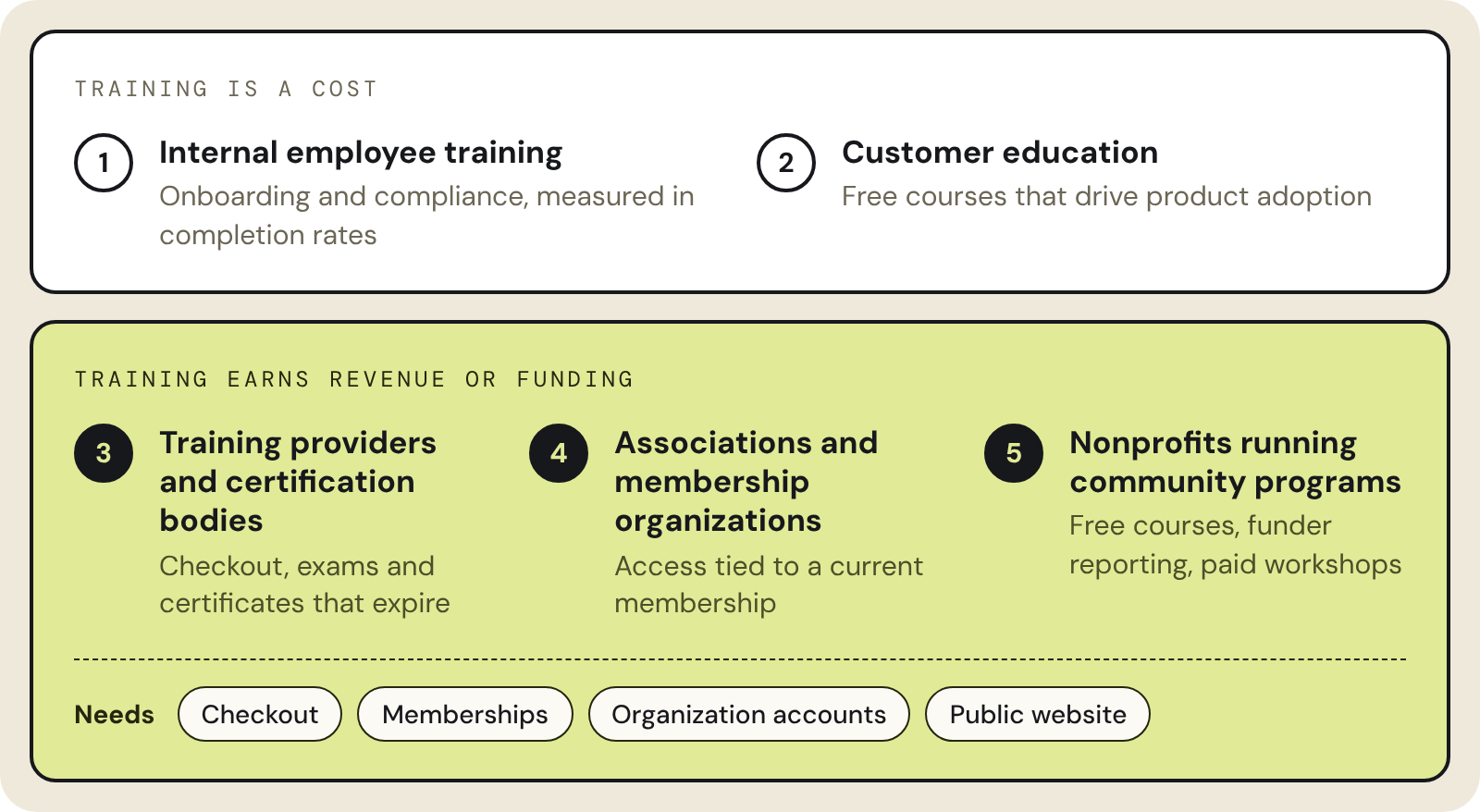
The last three groups in particular need certain LMS capabilities, including checkout, memberships, organization accounts, and reporting tied to the same record as the course, along with a public website to promote their programs.
Many LMS platforms were designed with the first two groups in mind, so these organizations often end up adding a store, a membership plugin, and a separate website around them.
Core dna offers an all-in-one LMS with built-in commerce. Teams can use it to sell courses, memberships, and recertifications on the same platform that runs the courses and the public website. As a result, a learner's purchases, enrollments, and certificates sit on a single record.
Our team is also available to help scope, build, and support each setup, so you don't need to search for an additional implementation partner.
Whichever platform you choose, the selection process follows the same six steps. They start with the people you train and how they get access, and end with moving your records off the current system. Along the way, you'll find questions to put to every vendor on your shortlist, including us.
Steps to Selecting the Right LMS for Your Organization
Once you know which group you're in, the selection process comes down to six steps, from defining who you train to planning the move.
1. Define Who You Train and How Training Pays
List every role that will use the system. For associations and training providers, that usually means platform administrators, executives who oversee several locations, organization managers who handle their team's seats, and the learners themselves. Each role needs different access to content, reports, and purchasing.
Next, describe how learners access training. For example, annual memberships with auto-renewal and one-off course purchases are different. Additionally, seat packs that organizations buy for their staff, recertification fees, and free enrollments each need different handling at checkout and in reporting. If funders pay for a program, note what they expect you to report.
Next, take note of any accreditation rules. For example, if your courses carry continuing education (CE) credits, you will need to record the credit types per course, how long each certificate stays valid, and whether courses reset every year.
The answers tell you which category to shop in.
Employee-only training fits a standard corporate LMS. A handful of paid courses might work with an LMS and an add-on store. On the other hand, memberships, seat sales, certificate renewals, or funder reporting across several programs point toward one platform that runs courses, commerce, and the website together.
2. Map the Systems Training Touches
An LMS for training is never the only tool being used to support the business. A typical association or training provider runs a website, an LMS, a store or billing tool, a membership database, a CRM, accounting software, a support desk, and single sign-on. Put them all on one page and mark which ones hold learner data.
Next, trace a single learner from their first visit to their first renewal. Count how many systems store a copy of their name, purchase, enrollment, and certificate. Every time this gets handed off to another system, think of it as an integration someone has to maintain. When one breaks, a learner pays and doesn't get access, or a certificate stops matching the order behind it, and your support team hears about it from an unhappy customer.
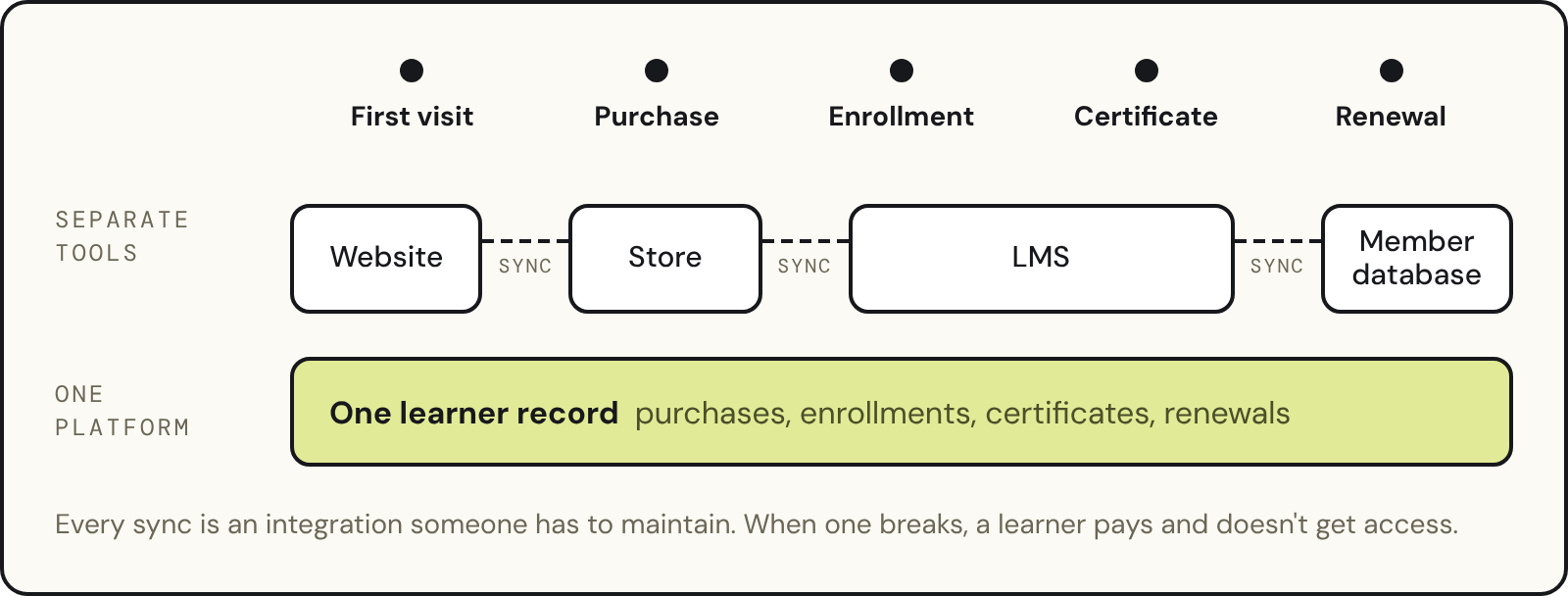
This map is where you decide whether to keep separate tools connected by integrations or move to one platform that holds the learner record in one place. Both can work; however, separate tools let you pick a specialist for each job, while one platform leaves fewer connections for your team to look after.
3. Set Requirements by Priority
You will need to sort every requirement into dealbreakers and nice-to-haves before you speak to vendors. A short dealbreaker list keeps each demo focused on what you can't run your programs without. For most associations, nonprofits, and training providers, it looks like this.
- Access rules: Each program has its own pricing, content library, and renewal rules, and access ends when a membership lapses.
- Organization accounts: Each client organization's data stays separate. Admins can upload users in bulk and move a seat to a new employee without losing the previous learner's history.
- Certificates and CE credits: Courses often carry several credit types and more than one version. After an annual reset, past certificates stay on the learner's transcript.
- Reporting: Completions, organization progress, seat use, and revenue should be visible by role and exportable to CSV or Excel.
- Integrations: The platform connects to your payment provider, CRM, accounting system, support desk, and single sign-on.
- Security: Look for a staging environment, audit logs, backups, and the compliance documentation your own clients ask for.
Localization, AI features and community forums sit lower for most buyers. Move them up if one of your programs depends on them.
When you send the list out, ask vendors to mark each item as native, handled through configuration, a third-party integration, custom development, or not supported. Anything that needs custom development adds cost and time, and someone has to maintain it after launch. If you're writing a formal RFP, our guide to LMS RFP requirements turns this list into the sections vendors answer line by line.
4. Compare the Total Cost of Ownership
Some LMS vendors charge per active user each month, while others charge per registered user, by tier, or through a flat subscription. Registered-user pricing gets expensive when your learners come from outside the organization, because it charges for people who signed up once and never came back.
However, the license is only one line in the budget. You also need to factor in the following costs.
- Implementation and configuration
- Data migration from your current systems
- Any add-on store, billing tool, or membership plugin
- Transaction fees on course sales
- The support plan and admin training
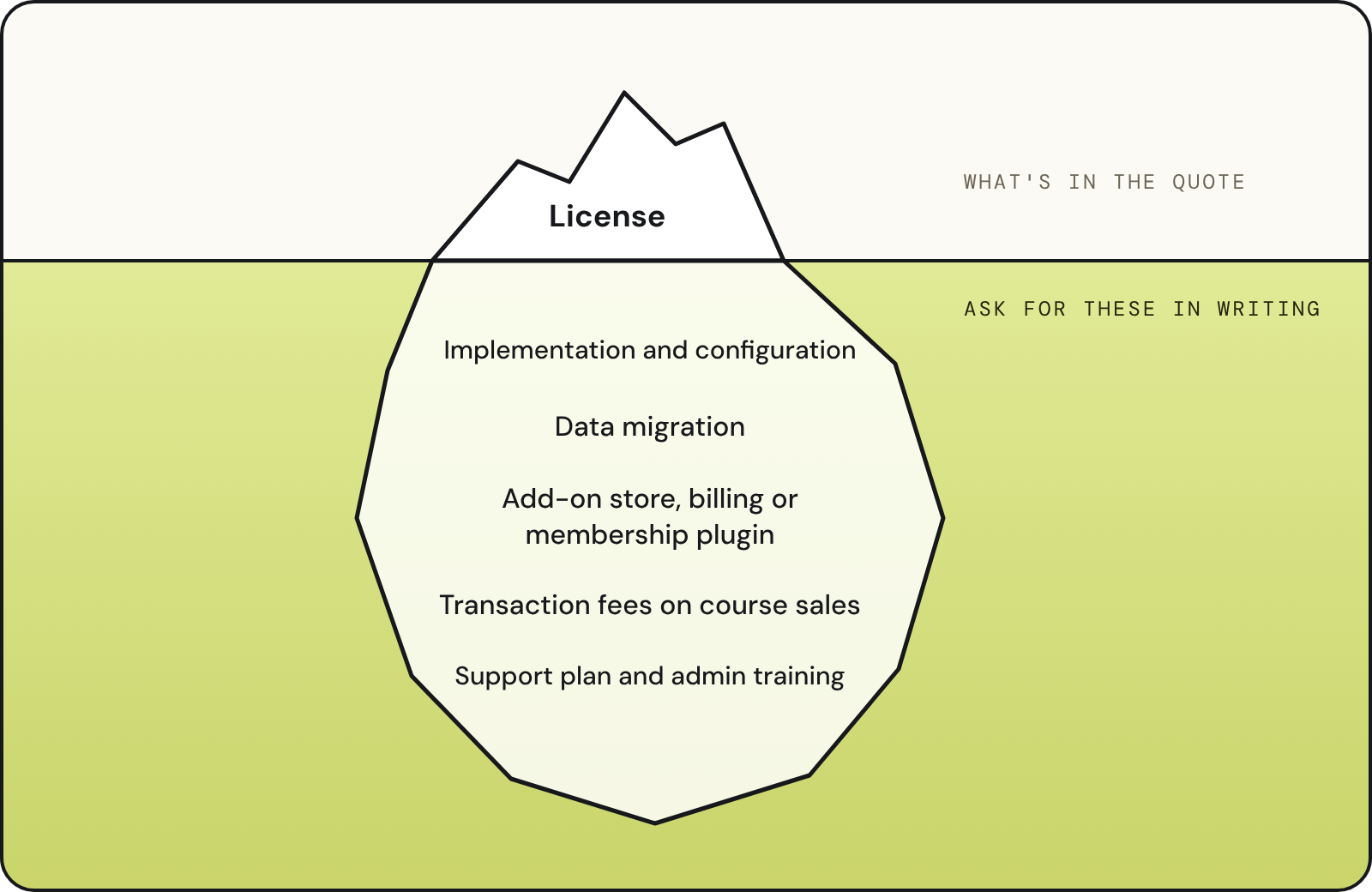
Get implementation and ongoing support costs in writing before the demo stage. Then work out when the new system pays for itself. Count the admin hours you'd save on manual enrollments, seat changes and certificate fixes, plus the renewals you currently lose to missed follow-up.
For free or funded programs, count the hours your team spends assembling participation reports by hand. A large implementation fee on a small catalog may not pay back within the contract term, so the project scope should match the size of the program.
5. Shortlist and Run Demos on Your Scenarios
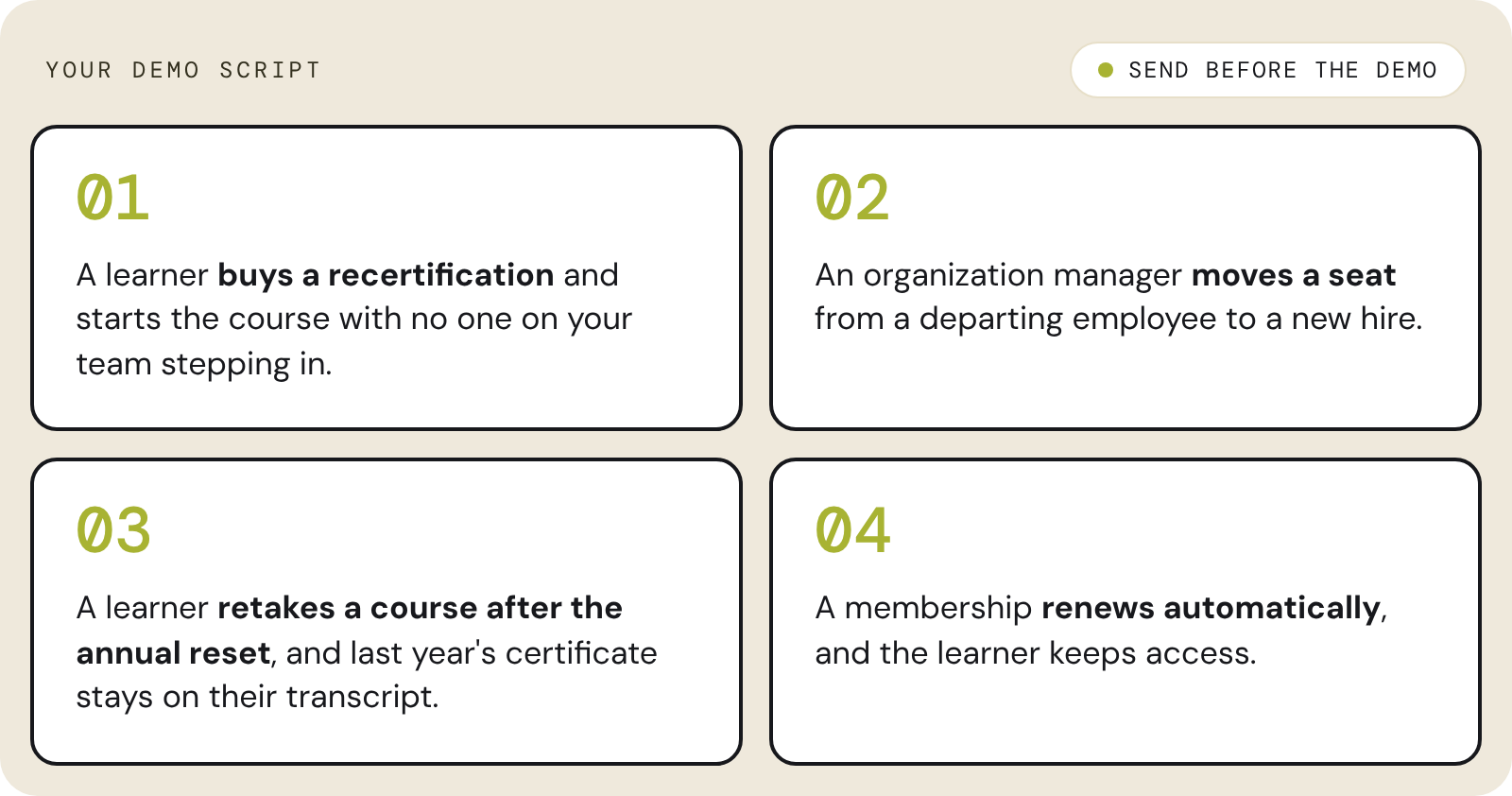
Shortlist three or four vendors that meet every dealbreaker. Before each demo, send them a few scenarios and ask them to walk through those instead of their usual script. For example:
- A learner buys a recertification and starts the course without anyone on your team stepping in.
- An organization manager moves a seat from a departing employee to a new hire.
- A learner retakes a course after the annual reset, and last year's certificate is still on their transcript.
- A membership renews automatically, and the learner keeps access.
Use the same calls to find out who will do the work. Ask whether the vendor's own team handles implementation or hands it to a partner you contact after launch, how your admins get trained, and what timeline they'd expect for a setup like yours. If you can, speak with a customer who moved off the system you use now.
6. Plan Migration and Rollout
Before migrating, you need a list of what needs to move from the old platform or platforms to the new one. For most organizations, member lists, orders, enrollments, completions, certificate records, and course content fall under this list. Additionally, SCORM packages can usually move as-is, while courses built in the old system's editor may need rebuilding.
If possible, run a trial migration into a staging copy of the new platform and check record counts against the old system. You will need to pay close attention to certificates, since learners and accrediting bodies notice when one goes missing. Set redirects for course and program pages so your search rankings carry over.
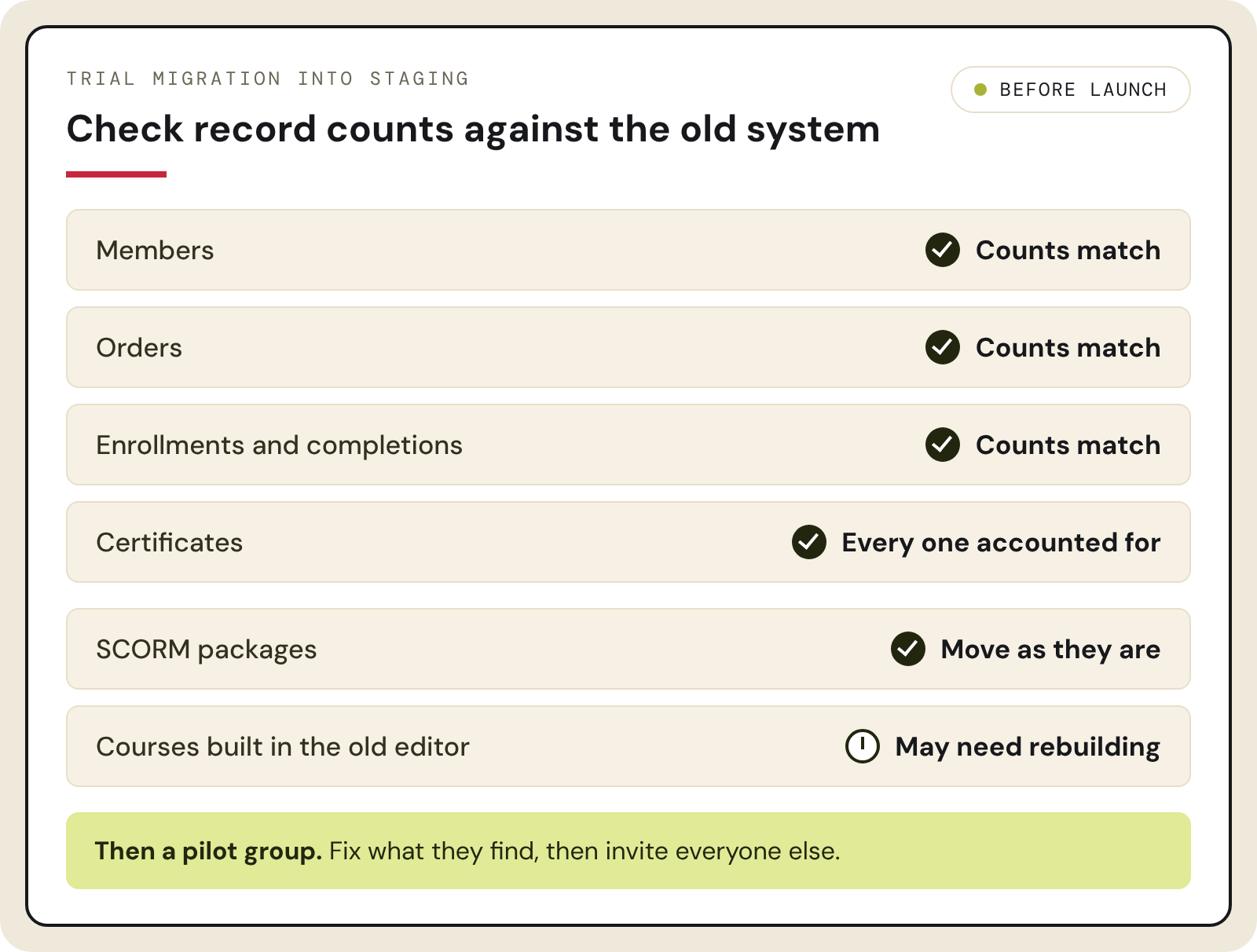
Many organizations are using setups like WordPress with a plugin such as LearnDash, standalone LMSs, and platforms being retired, such as Saba Cloud. Whatever you're leaving, open the new platform to a pilot group first, fix what they find, then invite everyone else.
Choosing Core dna as Your LMS
Core dna runs an LMS with ecommerce and a CMS on one platform for associations, nonprofits, and training providers. Our own team scopes, builds, and supports each implementation.
- Courses, checkout, memberships and the public website share one admin and one database.
- Each learner has one record from first purchase through every renewal. Organization accounts, member roles, courses and invoices all read from it.
- SCORM packages and courses built in the platform run under the same access rules and reporting.
- One subscription covers software, hosting, security, and support. There's no per-learner licensing and no transaction fee on course sales.
Additionally, Core dna isn't just a vendor that sells you software and then sends you on your way. We also support you in ensuring the platform meets your unique needs.
- Discovery: Core dna's team works with you through your roles, membership and pricing logic, certificate model, integrations, and reporting.
- Build: Production, staging, and development environments are included, so your team can test enrollment, access, and checkout before any learner sees them.
- Migration: Members, orders, enrollments, completions and certificates are mapped, trial-migrated into staging and checked against the source.
- After launch: The people who built your platform also support it, so you don't have to search for an implementation partner to help you every time something changes.
How YMCA and Save a Life Run Training on Core dna
Save a Life Sells Certifications, Recertifications and Bundles in Two Languages
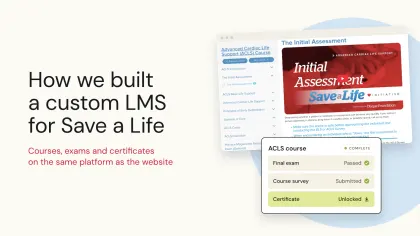
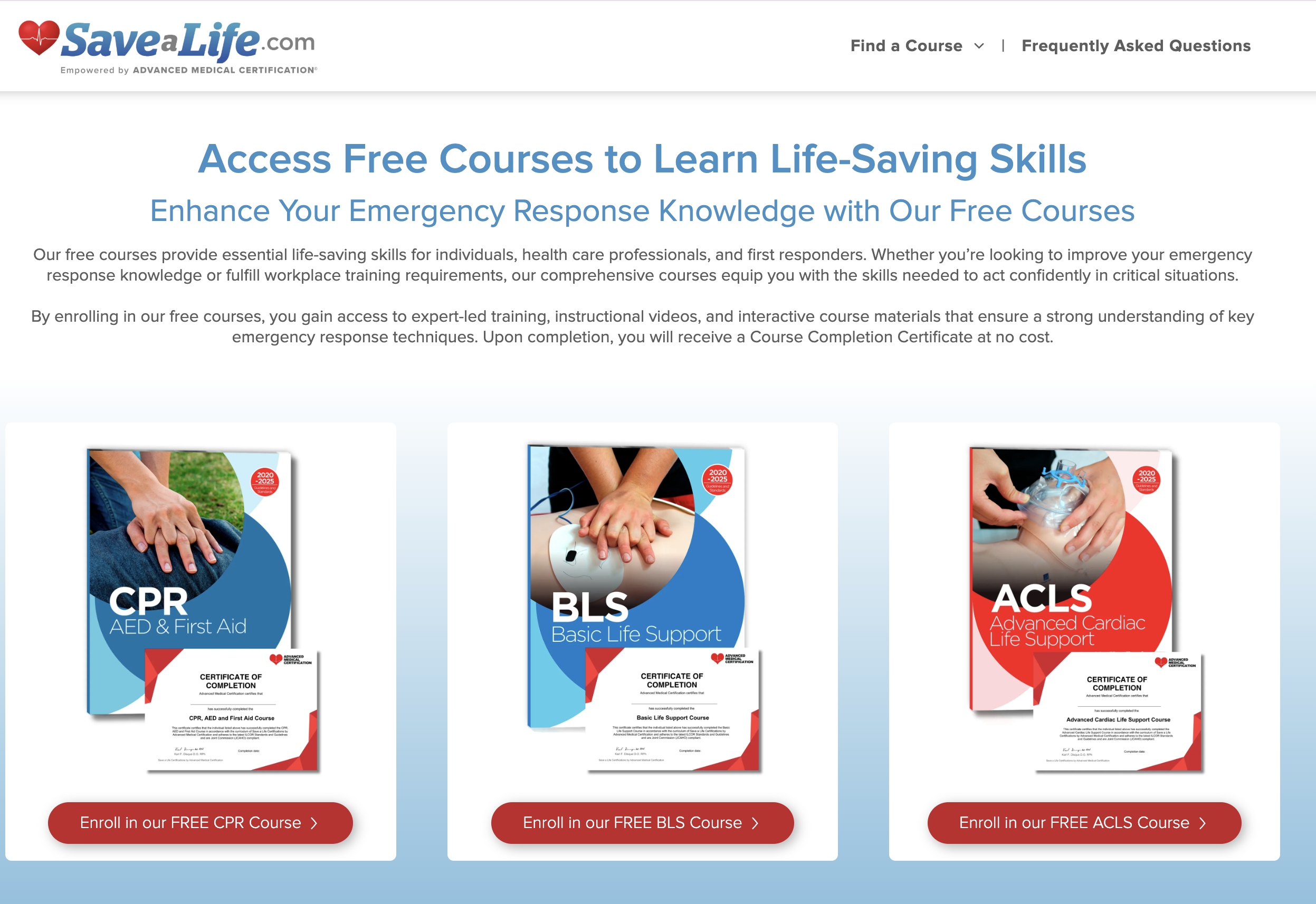 Save a Life delivers CPR, BLS, and other certification training. It replaced WordPress, a standalone LMS, and a separate store with Core dna, so content, checkout, and certificates now run on one platform with one login. Read how we built Save a Life's custom LMS.
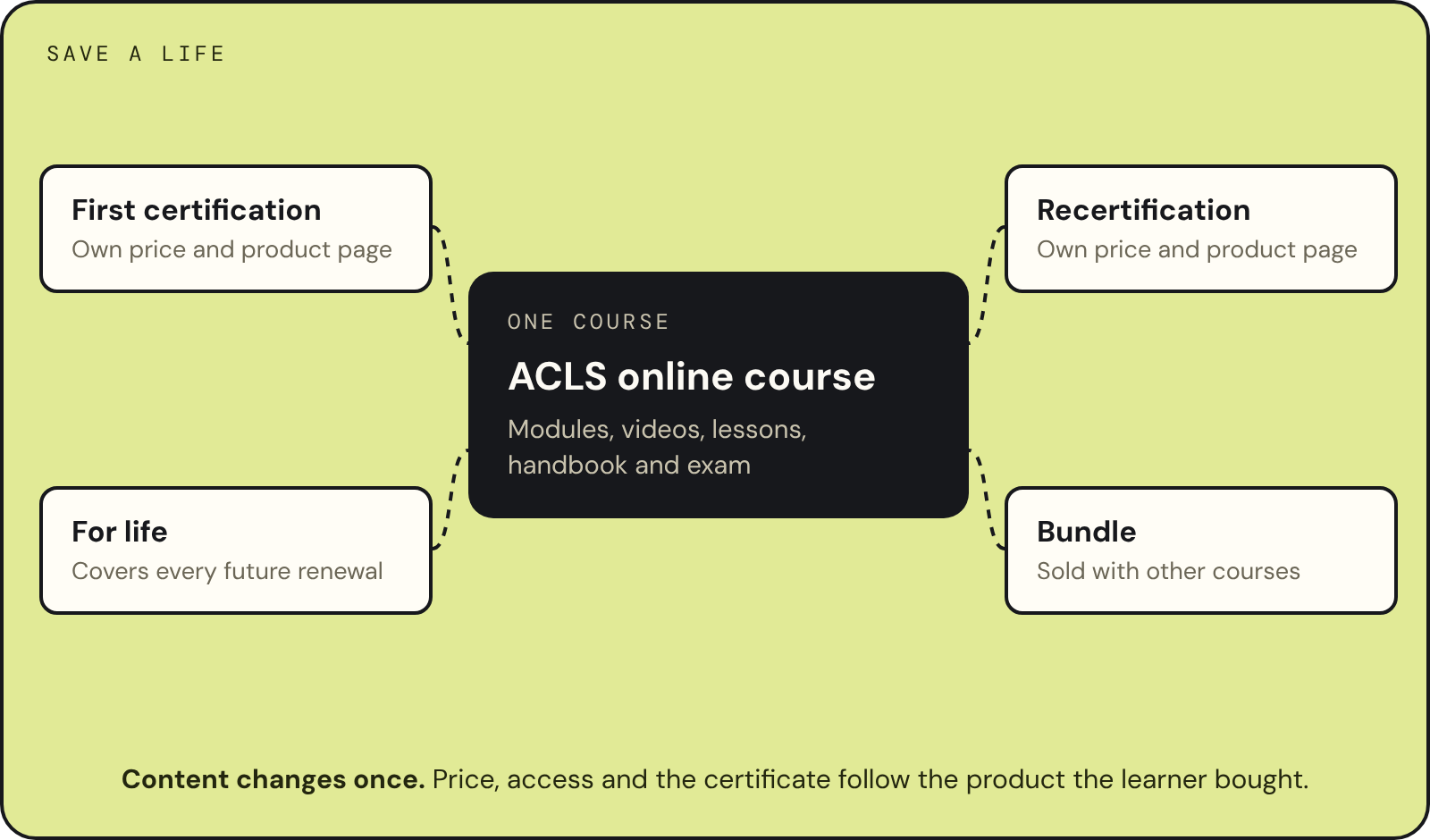
- One course behind several products: Each course sells as a first certification, a recertification, a for-life product, and part of a bundle. Content changes in one place, and price, access, and certificates follow whichever product the learner bought. In the first eight weeks of 2026, recertifications made up 58% of its enrollments.
- New markets: An AI agent drafted Spanish versions of about 1,700 pages through Core dna's MCP server, and a medical advisor approved each one before it went live. Spanish-speaking learners get their own courses, exams, and checkout in local currency.
YMCA Ignite Runs Its Learning Platform Alongside ymcagta.org
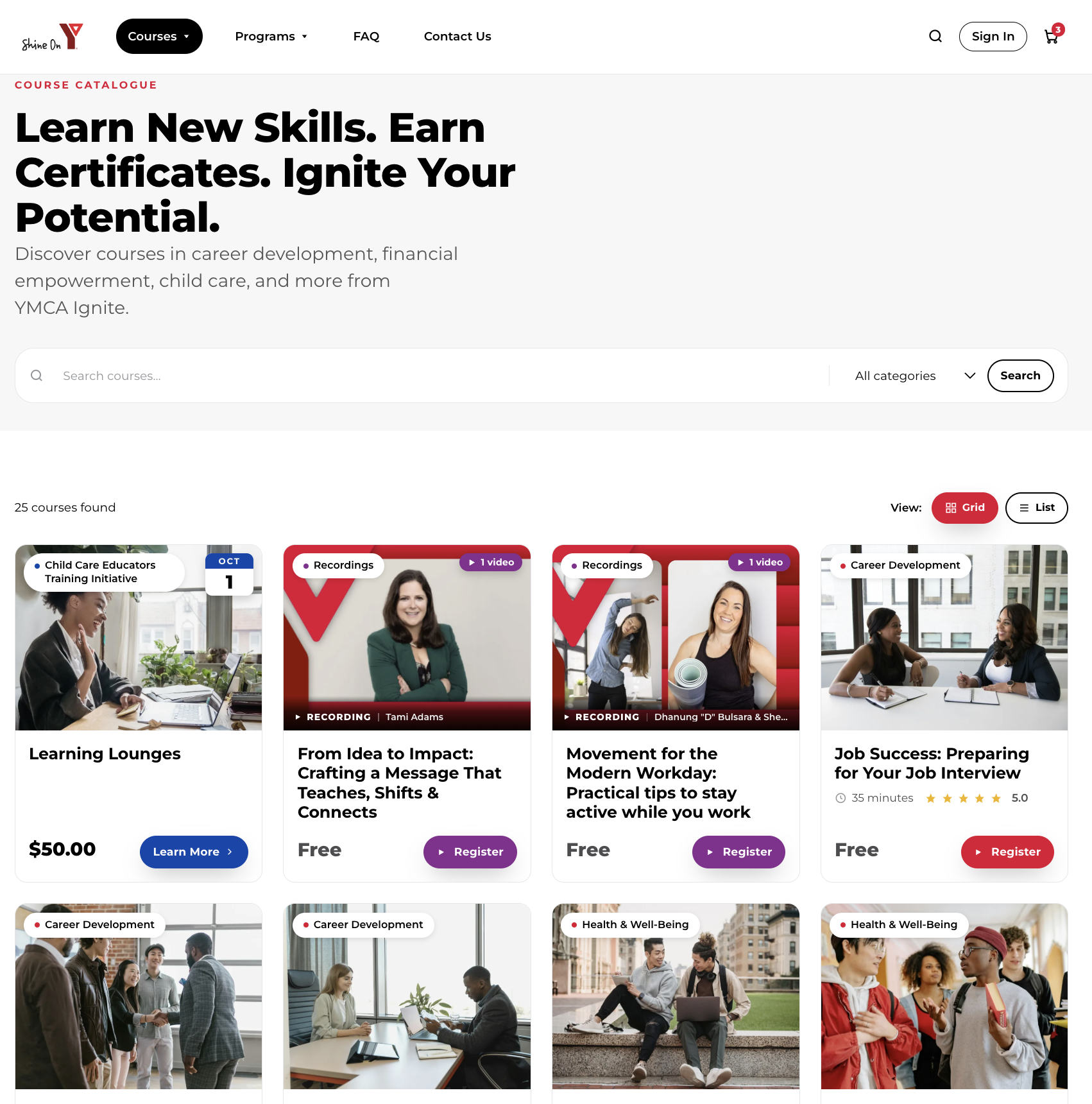
YMCA Ignite is the online learning platform of YMCA of Greater Toronto. It offers free and low-cost courses in career development, financial empowerment, entrepreneurship, and child care to more than 41,000 learners across Canada. With Core dna, Ignite runs on the same platform as the YMCA website, with user records shared between the two.
- Free and paid programs: Every free enrollment still creates an order, so free learners are counted the same way as paying ones.
- Moving off Absorb: Ignite moved its SCORM courses and learners from Absorb in about six weeks. Core dna's team built the SCORM workflow and, after launch, rebuilt the monthly participant report YMCA's funders rely on.
- Proctored certification: Core dna is connecting online exam proctoring to Ignite for a food handler course YMCA is preparing for Ontario accreditation. Certificates are held until the review comes back valid, usually within 24 hours, then issued with a five-year expiry.
Wondering how your training programs would run on Core dna? Book an LMS demo to walk through your situation with the people who would build them.
Choosing an LMS: FAQ
One subscription covers software, hosting, security and support. There are no transaction fees on course sales and no per-learner licensing. Cost depends on scope: the certification model, integrations and migration volume.
Yes. Members, orders, enrolments, completions and certificate records are mapped to Core dna, trial-migrated into staging and reconciled against the source before launch. Historical certificates can be regenerated from the migrated records, and redirects keep existing pages and rankings in place. Save a Life moved from WordPress, a standalone LMS and a separate store, and YMCA Ignite moved its SCORM courses and learners from Absorb.
Yes. Recertification can be sold as its own product on the same course. Each renewal creates a new enrolment with its own exam attempt and certificate, and earlier certificates stay in the learner's account. Save a Life sells each course as a first certification, a recertification, a for-life product and part of a bundle.
Yes. Accredited courses can issue a separate continuing education certificate alongside the completion certificate, and credits can be sold as their own product. Advanced Medical Certification sells CME credits on its ACLS practice test course.
Summarize with