Webhooks and APIs both let two applications exchange data — the difference is who starts the exchange. A webhook is event-driven: it automatically pushes data to you the moment something happens, like an order being placed. An API is request-driven: your system asks for data whenever it needs it. Use a webhook for real-time updates, and an API when you need to control the timing.
Building integrated ecosystems is crucial for all types of industries and businesses. With integrations, teams can create powerful automation that streamlines operations and marketing efforts. To set up these automations, your tech stack needs to communicate effectively — and webhooks and APIs are the two main ways software applications do that.
Understanding the differences and the advantages of each is crucial to knowing when and how to use them. In this article, we lay out the differences between the two methods of data communication and explain how you can leverage each one to make sure your systems are delivering the right data to you.

What are Webhooks?
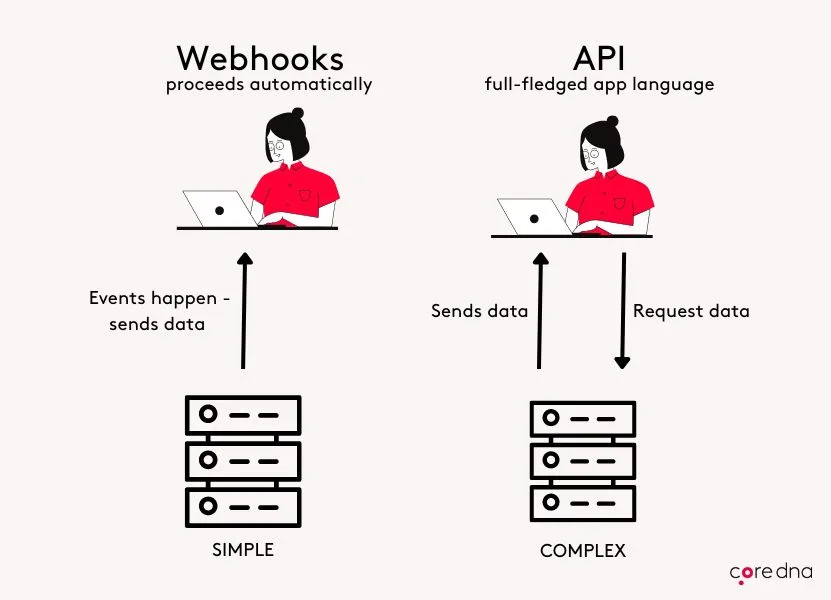
Webhook integrations (sometimes called a reverse API) are a way of delivering real-time information in an event-based manner. They are a one-way communication channel initiated via triggers.
Webhooks can be sent to your application whenever a relevant event occurs. Examples of such events include when a new user is created, an order is placed, or a shipment is updated.
The webhook request is sent to a specified URL with the data in the request’s body. It’s called a “webhook” because it comes from the web — from an external source (in this case, a web server) — and it hooks into your web apps via an HTTP request. The advantage of webhooks is lightweight, simple integration for real-time data.
An example of a webhook integration is when a notification appears in the marketing Slack channel every time there is a document download. That communication between the website and Slack is done via a webhook.
What are APIs?
APIs — application programming interfaces — are like the big brother of webhooks. They are bigger, more complex, and require more understanding.
In more technical terms, an API is a two-way communication channel (request and response), with a set of routines, protocols, and tools that help different software communicate and send data to each other.
APIs allow businesses and their providers to create a bridge for data to circulate between specific software applications. The advantage of integrating via an API is that businesses get to decide when to receive the information.
An API integration we all experience every day is the Google Weather app. While Google doesn’t predict the weather itself, it has API integrations with The Weather Channel, Weather Underground and AccuWeather, pulling information for users every time they request data.
What’s the Difference Between Webhooks and APIs?
Webhooks and APIs both open communication channels between two or more software applications — the main difference is how they do it.
As explained above, webhooks are real-time, event-triggered notifications. This means the flow of data into your system is controlled by the events happening, not by you. If there are 100 comments on your blog in an hour and you set up a webhook to notify you when comments are made, you will receive 100 notifications within that hour.
An API, on the other hand, requires two-way communication: a data request and a response. To retrieve data from an API, your system needs to request it — and you can do that as frequently as you like.
An example of an API use case would be an expense management tool integrated with an ERP. The finance team wants all the data from the expense management system at the end of each day, which can be set up via an API integration.
So, put simply: webhooks are triggered by events, not by requests, whereas APIs require clients to send data requests to servers or other applications.
| Webhook | API | |
|---|---|---|
| How it’s triggered | Automatically, by an event | Manually, by a request |
| Direction | One-way (push) | Two-way (request and response) |
| Timing | Real time, as events happen | On demand, whenever you ask |
| Who controls the data flow | The source app and the event | You and the requesting system |
| Resource load | Light — no constant polling | Heavier — repeated requests to fetch updates |
| Best for | Real-time notifications: orders, payments, inventory changes | On-demand data: catalog syncs, queries, scheduled transfers |
| eCommerce example | Notify systems the instant an order status changes | Pull product or customer data between platforms on a schedule |
Best Practices for Webhooks
Now that we know how webhooks work, understanding how to make them secure is crucial — especially because webhooks are URLs that are publicly accessible on the internet. Let’s look at some best practices for using webhooks:
- Validate who is sending you data: When receiving data from a webhook, the system needs to validate that it is coming from where it is supposed to. For example, if your data is coming from a CRM, the system needs a validation process for that CRM before accepting data. The way to do that is to check the payload is formatted correctly, has the right signatures, and doesn’t contain any malicious content.
- Plan for webhook failure: Server downtime is inevitable, which is why you want to be prepared. When downtime happens, the data sent won’t be processed, so you need to put in place an asynchronous processing strategy that ingests and queues your event logs until you can process them again. This ensures you don’t lose any of the data.
- Limit how much data you are sending: Where possible, limit the number of requests per second coming into your endpoint using rate-limiting techniques like throttling requests as they arrive, or setting up a queue for processing so that if one request takes too long, another won’t be affected by it.
In short, a webhook is an incredible tool for real-time data needs.
If we take eCommerce as an example, the ideal uses of webhooks would include the following:
Best Scenario for Webhook in eCommerce:
- Inventory Management: Webhooks can update all systems in real time when inventory levels change. This keeps stock levels up to date across every platform for a better customer experience.
- Order Status Updates: Webhooks can also be used to update the order status. After an order is placed, they can instantly notify customers, fulfillment services, or CRM systems about new orders or changes in order status (like shipped, delivered, or canceled) — no manual checks needed.
- Payment Status: Webhooks from payment gateways notify the eCommerce platform when a payment has been processed, failed, or refunded, allowing for immediate action in the order management system.
Advantages:
- Immediate Notification: Webhooks push updates as soon as events occur.
- Resource Efficiency: Reduces server load, as there’s no constant API polling.
- Scalability: Ideal for high-volume transactions where real-time data is crucial.
Best Practices for APIs
When it comes to APIs, here are a few best practices for using them:
- Use SSL/TLS for all connections (HTTPS): This helps ensure that data sent between clients and servers is encrypted, preventing your information from ending up in the wrong hands and protecting sensitive information such as passwords or credit card numbers.
- Authenticate requests: Authentication lets users prove who they are when accessing your data or services through an API, which helps prevent unauthorized access and keeps everything secure. There are many ways to authenticate (like OAuth 2), so pick the one that works best for you.
- Document your code: When creating a custom API, always document your code — and it’s even more crucial when you’re working with other people’s APIs. Write down what each method does and how it can be used. If you use a lot of external libraries, list them all in the documentation so others know what they need to install before using your code.
In short, APIs are a powerful and secure communication channel between systems.
If we take eCommerce as an example, the ideal uses of APIs would include the following:
Best Scenario for APIs in eCommerce:
- Product Catalog Management: APIs allow the seamless integration of product data from various sources or databases into your eCommerce platform, enabling dynamic product listings, price updates, and category management.
- Customer Data Sync: APIs are often used to integrate your eCommerce with CRM systems, creating a unified view of customer data across all your platforms for more personalized marketing, customer support, and more.
- Checkout and Payment Systems: APIs facilitate integration with multiple payment gateways in your checkout process. By integrating the latest payment solutions, you can offer customers options such as subscription models or payment plans.
- Marketplace Integration: For eCommerce businesses selling on multiple marketplaces, APIs are your friend when it comes to handling product listings, order processing, and inventory updates — no need to manually update each channel.
- Third-Party Services: APIs are the backbone of integrations with logistics, shipping, tax calculation services, and even social media.
Advantages:
- Control and Flexibility: APIs allow on-demand data requests, giving you more control over when and how data is fetched or sent.
- Complex Operations: Suitable for scenarios requiring more complex queries or operations, like searching extensive product databases or handling multi-step transactions.
- Standardization: RESTful APIs offer a standardized way to interact with services, making integration with various tools or platforms more straightforward.
How Core dna Uses Webhooks and API?
Core dna provides both webhook and API integrations with its content management and eCommerce platform, as they complement each other and suit different use cases.
Core dna developed a REST API for integrating our solutions with our clients’ existing software and applications. This allows a seamless flow of data across all systems.
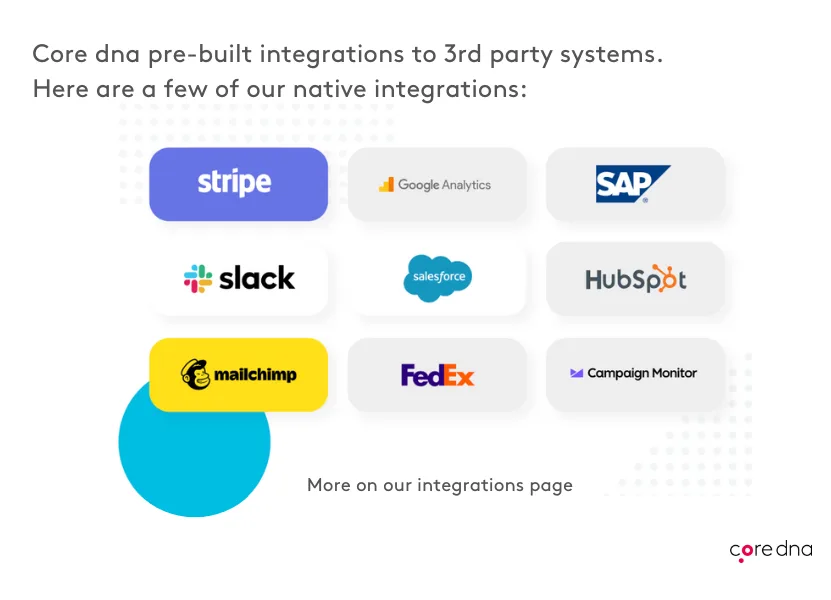
Core dna has built several native integrations with the most popular software for content and commerce clients: SAP, Salesforce, Oracle, UPS, Mailchimp, FedEx, and many more on our integrations page.
Core dna’s omnichannel and API-first design enables digital teams to develop experiences that span platforms, channels, and devices. This means APIs can be used with Core dna to send content to any channel or device and to connect with any third-party platform.
Core dna also offers hundreds of prebuilt native integrations through a webhooks engine to connect with your legacy systems, run file transfers, or work with the latest API technology.
While APIs and webhooks are different, they can be used together to create a more complete integration across all your platforms and software. Again, if the need is to receive real-time data as an event occurs, webhooks are best. If the need is to synchronize data between software systems, then an API is the answer.
The line between these two communication methods is increasingly blurry as the technology behind both matures, and together they will provide you with all the data needed to run a successful business.
No — though they're closely related. An API (application programming interface) is a two-way channel: your system sends a request and gets a response, so you control when data moves. A webhook is one-way and event-driven: the moment something happens — an order is placed, a payment clears — the source app automatically pushes the data to a URL you specify, with no request needed.
The simplest way to think about it: with an API you ask for data; with a webhook the data comes to you. Core dna provides both a REST API and a webhooks engine, so you can use whichever fits the job.
Yes, and in practice most integrations do. A common pattern is to let a webhook notify your system the moment an event occurs — say, a new order — and then use an API call to pull the full order record or push an update back to another system. The webhook handles the real-time trigger; the API handles the on-demand data exchange.
Core dna is built for exactly this. Our platform pairs a documented REST API with a webhooks engine, so you can react to events in real time and query or sync data on your own schedule from the same integration.
Reach for a webhook when you need to act the instant something happens and don't want to keep asking — an order placed, a payment processed, inventory changed. The event pushes the data to you automatically, which is lighter on resources than repeatedly polling an API.
Reach for an API when your system needs to control the timing — pulling a product catalog on a schedule, syncing customer records, or running a query on demand. Many teams use both, and Core dna's content and commerce platform supports each pattern across its native integrations.
Yes. Core dna provides a documented REST API for integrating our content and commerce platform with your existing software, alongside a webhooks engine for real-time, event-driven updates.
On top of that, Core dna offers hundreds of prebuilt native integrations — SAP, Salesforce, Oracle, Stripe, HubSpot and more — so you can connect legacy systems, run file transfers, or build against the latest API technology. If a system has an API, Core dna can integrate with it.
Summarize with