CMS vs HTML comes down to one question: how often will the site change? Choose static HTML for a small brochure site that a developer edits a few times a year. Choose a CMS as soon as non-technical people need to publish, the page count grows past ten, or you need a blog, forms or a store.
But if you’re new to the game, you may have conducted some research and found that some web developers prefer to code websites in HTML, while others prefer to use something called a CMS (Content Management System).
Confused? We don’t blame you, which is why we’ve put this guide together to help you understand the difference.
Below we cover what each option is, the five differences that matter in practice, and when a CMS stops being enough. If you have already settled on a CMS and only need to choose one, our CMS comparison is the faster route. If you are moving an existing HTML site across, start with the CMS migration checklist.
What is HTML?
HTML is a language that allows you to create websites, web pages, and apps. It is very simple to use and understand. Business stakeholders, project managers, developers, and designers like it because it is easy to learn and install. It is also free and open source. You can use it for your own projects or even sell it if you wish. It works in every browser and is easy to change. It is also easy to integrate with other programming tools.
Without HTML, we would have web pages that would look no less interesting than a page of unformatted text. HTML allows us to add style to text, insert and format images, embed video, customize fonts, add color, and a whole lot more.
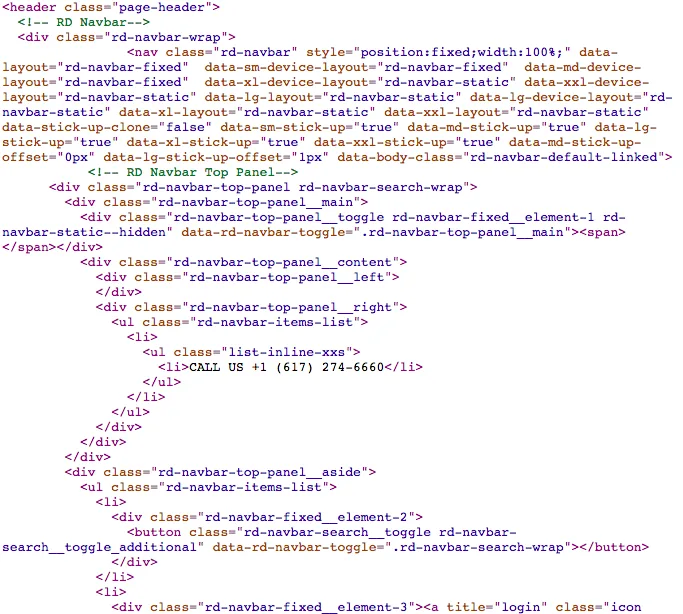
The example below shows you the HTML coding for Core dna’s homepage:
What are the benefits of HTML?
Although many people say HTML is old technology, the reality is that this language still powers every website on the internet. Even sites built on the most modern frameworks are delivered to the browser as HTML and CSS, which handles the formatting.
1. Website speed
Page speed is a real ranking signal, but not the one this article originally described. Google measures it through Core Web Vitals, and since March 2024 the responsiveness metric has been Interaction to Next Paint rather than First Input Delay. It is a modest signal next to relevance and links, so treat it as a tie-breaker rather than a strategy, as we explain in does your Lighthouse score really affect your SEO. The stronger argument for speed is the visitor on a weak mobile connection, and a static page with no database queries and no plugin stack has very little standing in its way.
2. HTML is supported by every browser
HTML renders in every browser, which is part of why it is still the safest foundation to build on. It is also the smallest thing you can send down the wire. There is no application layer sitting between the request and the response, so the page performs exactly as written.
3. Modern static sites are generated, not hand-coded
One thing has genuinely changed since this comparison first mattered. Almost nobody hand-writes static HTML page by page anymore. Static site generators such as Astro, Eleventy, Jekyll and Next.js build the HTML for you from templates and content files, so you get the speed and security of a static site without editing forty files by hand. That closes part of the gap described below, but not the part that matters most: someone still has to work in a code repository to publish a change. We compare the two approaches directly in headless CMS vs static site generator.
CMS vs HTML: What is the difference?
It is important to note that almost every website is made with using HTML and CSS (Cascading Style Sheets) coding language. The question is, was it coded from scratch, or is the web page using a CMS to piece the page together more easily?
You see, with a Content management system, you can often use pre-built templates to launch web pages more quickly. You can then customize those templates to make them your own.
This is obviously a lot faster than coding something from scratch, and is especially useful if you have no coding knowledge.
But besides that, there are some significant differences between HTML-only websites and CMS-powered websites.
1. Website management
If you decide to create a website that only has one or two pages that will rarely need updating, then using HTML might be ideal.
However, for most businesses, a broader, more dynamic website is needed. A CMS solution is a better option if you’re creating a large website with multiple pages, or if you plan to make changes or additions to your website down the line.
That’s because a CMS will make it easier to do things like edit existing pages, publish new pages, add an online store, create web forms, and so forth.
2. Time to market
One notable reason why many businesses tend to opt for a CMS platform is that it accelerates the production of a website or websites. Most content management platforms come with a host of pre-built themes.
But the main setback to using these pre-built themes is that your website won’t stand out or come across as unique. So you would need some knowledge of HTML or CSS to customize the design.
For HTML-only websites, you need to design, code and setup your website from scratch. And in terms of cost, setting up an HTML-only site can get expensive, especially if you’re going to hire outside help to program your website.
3. Customization
Besides overhauling the design of a theme on a CMS, making changes to a static page (or any other type of page), whether it is changing a photo or adjusting the text, is pretty much painless, thanks to its frontend user interface. Whereas, on an HTML website, design changes are more difficult.
You have to change all the pages one by one manually, and you also have to edit the site’s CSS to make the necessary adjustments.
4. Multi-user support
If you tend to create a large website with multiple services, features, and a blog, then a CMS is perfect since most CMS solutions give you multi-user support.
With a CMS, user accounts can easily be created, and you can assign a role (i.e. admin, contributor etc.) to each user. It is particularly useful to have this feature if you’re regularly updating product pages and publish blog articles on your site.
5. Previews and testing
The beauty of having a CMS is that you can preview your website with the click of a button, so you can make any changes that you see fit. This is much harder when you’re building an HTML-only website.
In many cases, you would have to copy and paste your HTML coding onto a plain text file, save it, close it and then open it with your browser so you can preview your site.
This is a bit long-winded, and if you do spot an error, it is much harder for you to correct as you will have to comb through your coding to seek out the anomaly that is causing the issue.
How can a flexible CMS help your business?
The low barrier to entry and the functionality bundled into a modern CMS bring advantages to startups, small companies, and enterprises alike.
It is also worth knowing that content management systems keep evolving. Most large organizations now run a DXP (digital experience platform) rather than a CMS on its own.
Why? Because your content no longer has a single destination. The same product description has to render on your website, feed your app, populate a marketplace listing, and be readable by the AI answer engines and agents that will summarize your page before a visitor ever reaches it. Hand-coded HTML gives you one channel and one copy of the content. A platform gives you one source of content that every channel reads from.
Traditional CMS platforms struggle to push content to all of those surfaces, while DXPs can deliver personalized, omnichannel experiences at scale.
Features like digital asset management, user collaboration, workflow management, analytics, eCommerce functionality, and cloud hosting are bundled into most DXPs.
So if you’re choosing between coding from scratch and using a CMS, we would point you to the CMS, with one condition attached: it should treat structured content and machine readability as core features rather than an SEO plugin bolted on at the end. Our guide on how to choose a CMS works through the rest of the criteria.
No, technical expertise is not needed in order to use Core dna. Core dna is built for businesses and the people that run them.
You do not need a background in IT or knowledge of technical jargon, or programming language. As long as you have basic computer skills you will be able to use our straightforward and intuitive platform.
Core dna is built as a continuously evolving solution, pioneering the new paradigm of design, build, and evolve when it comes to websites.
We invest heavily in research and development in order to regularly offer new products and upgrades. Our experienced staff have specialized skill sets and continuously provide invaluable knowledge and innovation, which is passed on to all of our users on an ongoing basis.
A 10-minute overview of development on Core dna. Learn about Smarty, GIT, our deployment environment, and more!
Summarize with