Clark Rubber is an Australian franchise retailer of pool, rubber, foam and cleaning products, with more than 60 stores run by franchisees. Its website has run on Core dna since 2022 (see the main Clark Rubber story), and each store fulfils online orders from its own stock (see multi-location inventory management).
Behind the website sits Pronto, Clark Rubber's ERP. This story covers how the two stay in step: how orders reach the right store's records, how price and stock changes reach the website, and how the integration catches problems before customers or franchisees do. It runs as a set of jobs in Core dna's Orchestration module.
The challenge
In a franchise network, the ERP isn't one set of books. In Pronto, each Clark Rubber store has its own dataset, and master datasets hold the product catalog, base prices and sale prices. A national website has to read prices from the master data, stock from each store, and send each online order to the store that will fulfil it.
It also has to keep up. Prices and promotions change, stock moves through 60+ stores all day, and stores update orders when they fulfil them. If the website falls behind, customers order stock that isn't there, and franchisees can't be paid correctly for the online orders they fulfil.
What Clark Rubber needed
- Online orders in the fulfilling store's Pronto records as soon as they're paid.
- Price, sale price and stock changes on the website as they happen in Pronto.
- Order status from Pronto back on the website, so stores are paid for the orders they fulfil.
- Protection for Pronto's API during busy periods and its overnight processing.
- Alerts when something fails, before customers or stores notice.
How the Pronto integration runs
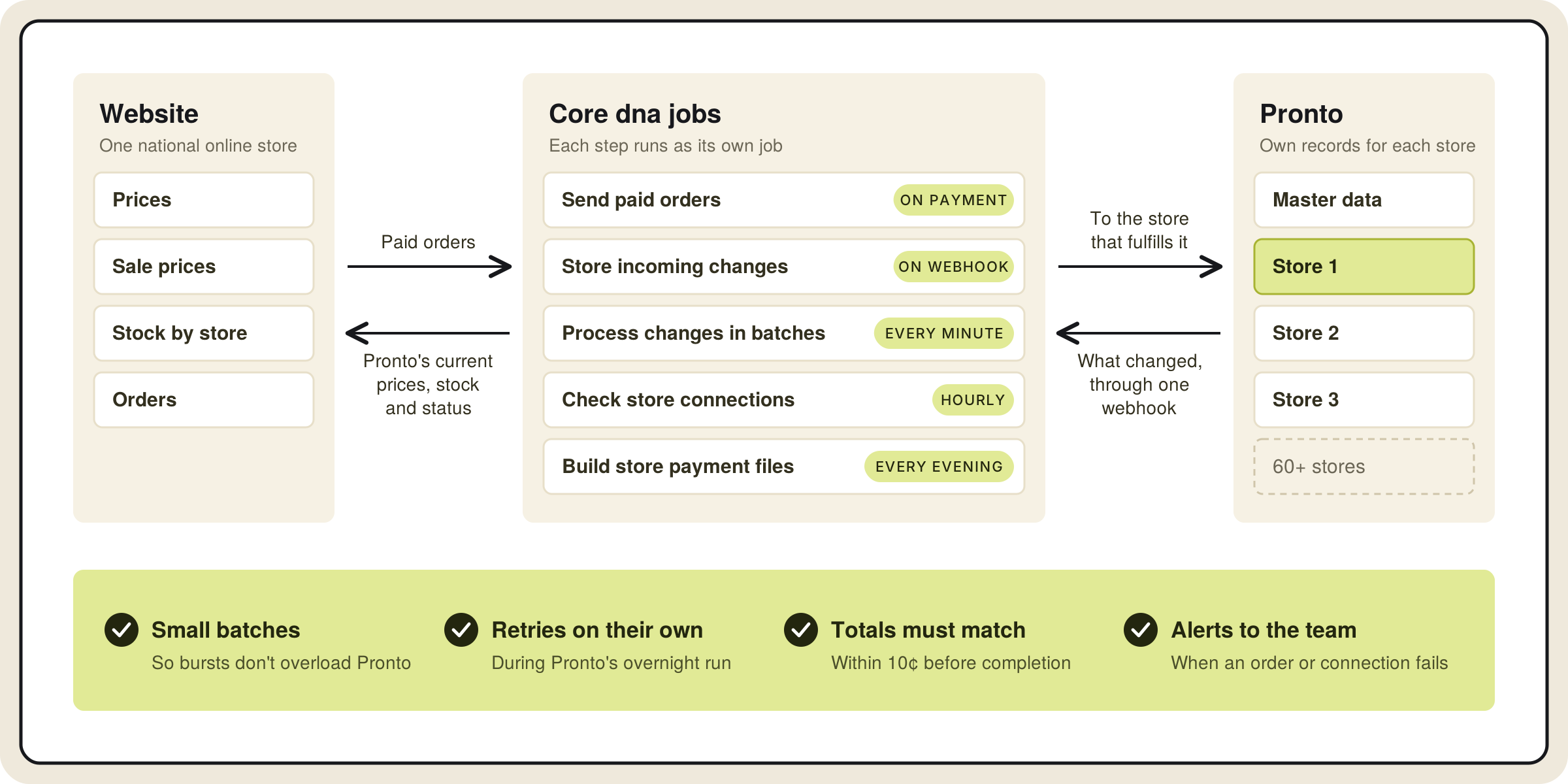
Orders out. When an online order is paid, a job sends it to the Pronto records of the store fulfilling it, books a delivery if it's a delivery order, and emails the store. If an order can't be sent to Pronto, the team is alerted straight away and a ticket is raised to fix it.
Changes in, through one webhook. Pronto calls one webhook on the website whenever a price, sale price, stock level or order changes. The message says which store, which record and which fields changed, and a collector job stores it as it arrives.
Processed in small batches. Every minute, a processing job takes the next batches and hands each update to the right job for pricing, stock or orders. That job fetches the current value from Pronto's API, so the website always uses Pronto's own figure. Small batches stop a burst of changes from overloading Pronto, a lock stops two batches running at once, and stock updates go through their own queue so they're written one batch at a time.
Retries on their own. Pronto runs end-of-day processing overnight, when its API may not answer. A batch that fails tries again the next minute, so updates catch up without anyone stepping in.
A check before completion. When a store marks an order as fulfilled in Pronto, the order job checks that the order exists on the website and that the totals match to within 10 cents. If they match, the order is marked complete. If they don't, customer service gets an email so the store can correct the order in Pronto.
New products from Pronto. The team uploads a CSV of item codes. A job fetches each item's name and price from Pronto and creates the product unpublished, with stock set up, ready for the team to finish and publish.
Hourly health checks. Every hour, a job checks that each store's Pronto connection is active and alerts the team if one isn't.
Want to see how it works?
Book a call with Core dna. We'll walk you through how orders, prices and stock move between a franchise website and the ERP, and how that would work for your network.
How stores are paid for online orders
Online sales go to the franchisee whose store fulfils the order. The same integration makes that work. When an order is completed in Pronto, the website flags it for that day's store payments.
Every evening, a job collects the day's completed orders, refunds and order transfers, works out what each store is owed or owes back, and produces the payment files finance uses to reconcile. Refunds and transfers are handled whether they happen before, during or after a store has been paid.
Questions to answer before connecting a franchise website to your ERP
- Is the ERP one set of books or one per store? Map where the catalog, base prices, sale prices and each store's stock live.
- What does the ERP send when something changes? If it only says which record changed, the website has to fetch the new value.
- How much can the ERP's API take? Batch incoming changes so a busy period doesn't overload it.
- When is the ERP unavailable? Plan retries around its end-of-day processing.
- What has to match before an order is complete? Compare totals, and send mismatches to someone who can fix them.
- Who hears about failures? Alerts should reach your team and the platform team at the same time.
For more, see B2B eCommerce ERP integration and the franchise platform.