


6 Rules of Enterprise eCommerce Replatforming
Summarize with
When it comes to enterprise ecommerce replatforming, don’t fall for the promise of simplicity unless your operations are straightforward enough to fit on an A4 page.
But if you’re running 50+ franchise sites or wrestling with complex B2B contract pricing, you already know the truth: simplicity is usually a lie. We’ve seen too many enterprise teams get backed into a corner by rigid templates that just weren't built for the real world."
Key takeaways
- Stop rebuilding every website from scratch. That model breaks faster than teams expect.
- Manage multi-site from one admin with shared structure, not from a pile of disconnected instances.
- Be very cautious about stitching your revenue engine together with third-party plugins.
- Keep inventory, pricing, and customer data flowing in real time.
- Use orchestration to reduce SaaS sprawl, not to justify adding “just one more tool.”
- Balance corporate guardrails with local autonomy. Too much control or too much freedom both create problems at scale.
Principle #1: The Framework Strategy
Most eCommerce platforms are built for the average case.
Here is the thing about most SaaS platforms. In practice, many of them are designed to push your business into a pre-set box built for far less complexity. They expect you to “adapt” your operations to their software. At core dna, we see that differently.
We do not build boxes. We build frameworks.
It sounds like a small shift in thinking, but it changes the dynamic. The technology should be flexible enough to support your business model, not the other way around.
Where templates start to break down
Templates are great when a business is just getting started and things are still fairly contained. That part is true. The problem usually shows up later.
A company can launch on a template, no issue. But it should still be able to grow and build on that within the same platform and not feel constrained by the original structure. If the moment you need something even slightly off-menu you start to feel friction, that’s usually a red flag.
What tends to happen is organizations feel like they only have two paths in front of them. Either they hire a developer to create a heavily custom feature that becomes harder to maintain over time, or the team absorbs the cost through manual workarounds because the “simple” tool can’t support the real business process.
In our experience, the real pain shows up a bit later. That’s when teams realize they’ve quietly outgrown the platform and now have to think about migrating again, which is never a small exercise.
Why framework-first changes the equation
For many teams trying to support complex B2B requirements, retail-first templates introduce structural limitations. Custom contract pricing, layered approvals, and multi-entity workflows tend to expose those gaps quickly.
A framework-first approach is designed to give you usable data models and workflow engines from the start.
Whether you are managing dozens of franchise sites like our client Clark Rubber or consolidating fragmented departmental properties like YMCA Greater Toronto, you need a platform that can support all this features as part of its core foundation rather than late-stage workarounds.
What this looks like in practice
What we usually do first is audit the workflows in detail. The goal is to find the parts that are a bit unusual or hard to template, because those are often the ones actually driving revenue.
From there, those workflows get baked directly into the platform logic. Automation handles the repetitive work, and the ERP connection makes sure the data flows across systems the way it should.
In most cases, that’s one of the more reliable ways to scale without continuously adding headcount.

Principle #2: Direct Engineering Access
The hidden bottleneck in enterprise support
Dealing with support chats and support emails, most teams already know how this goes.
One day it’s John answering your ticket. The next day it’s Alison. Every time, they have to go back, review the history, try to understand what is actually going on in your setup. And to be fair, that’s not really the fault of the individual support teams. It’s just how most SaaS models have been structured.
The reality is the model is built around volume. High ticket volume, high customer volume, standardized service layers. That’s how many platforms keep costs down and stay profitable. If they don’t maintain that scale, the economics start to break.
Where this starts to create tension is at the enterprise level.
Yes, you might get a dedicated account manager. Yes, you may get priority support. But let’s be clear, that experience is still very different from what teams are used to when they work closely with an agency that actually understands their environment.
And that gap is exactly where we saw a problem worth solving.
Why the traditional model creates friction
What we kept seeing in the market was this split. On one side, you have the SaaS platform. On the other side, you have the agency trying to help you make it all work. But the agency usually does not have deep, native access to the platform itself.
So what happens?
They build around the edges. They plug in tools. They stitch together APIs. They create workarounds that solve the immediate problem but quietly add complexity over time.
Before long, you are looking at what is essentially a Frankenstein stack. Pieces living outside the platform, connectors everywhere, custom logic sitting in three different places.
It works… until it doesn’t.
And the real risk shows up later, when you realize you cannot easily move. The stack is technically functional, but it is hanging together by one thread.
How Core dna closes the gap
This is exactly the gap we wanted to close with Direct Engineering Access.
It is not just “support,” and it is not just “agency.” It is the platform team and the architecture expertise working together in one place. The people helping you actually understand how the platform is built, because they are the ones who built it.
That changes the dynamic quite a bit.
Instead of layering workaround on workaround, teams can solve problems closer to the core of the platform. Instead of stitching together external fixes, you are making structural improvements that hold up over time.
And in most cases, that is what keeps teams from slowly drifting into the kind of complexity that is very hard to unwind later.
Support Model Comparison
Factor | Traditional SaaS | Core dna Direct Engineering |
Response Time | 24-72 hours for tier-1 screening before reaching qualified engineers | Direct engineering access with immediate context |
Expertise Level | Script-based responses from rotating support staff | Platform architects and senior developers |
Problem Resolution | Workarounds and documentation links | Custom solutions and platform adjustments |
Context Retention | Ticket-by-ticket handling with no continuity between interactions | Full business context and implementation history |
Principle #3: ERP and System Integration
eal-time, bidirectional integration is basically the nervous system of enterprise commerce. But what we still see in the market is that integrations, APIs, webhooks, all of that, are often sold almost like an add-on package.
It becomes this separate workstream. You need a separate team. Sometimes even a separate agency just to wire things together. And that is usually where complexity starts creeping in.
A lot of general SaaS commerce platforms try to solve this with plugin marketplaces. On paper, it sounds flexible. In reality, it often introduces a different kind of risk.
The hidden cost of the plugin marketplace model
What tends to happen is teams start stitching together third-party plugins to fill gaps in the platform. Each plugin is usually built in its own silo, by a different vendor, with a different set of assumptions about the environment it is going into.
Individually, they may work fine.
But once you start layering them into an existing enterprise stack, that is where friction shows up. Security becomes harder to reason about. Dependencies start to pile up. And sometimes, something that was working perfectly fine suddenly breaks because another plugin was updated upstream.
For enterprise ecommerce teams, that is not a small risk. Most of them are not looking to run their revenue engine on a loose collection of third-party components that were never really designed to operate together.
Why batch thinking quietly erodes trust
At the same time, we still see platforms that rely heavily on batch-style integrations. Your ERP syncs every hour, maybe every few hours, sometimes once a day.
On paper, that sounds acceptable. In practice, it creates real operational drag.
Your ERP is the source of truth for inventory, pricing, and credit limits. If your commerce platform is operating on delayed data, customer trust starts to erode pretty quickly.
You have probably seen the failure loop before. A customer purchases something that appears in stock. The warehouse later flags it as backordered because the inventory sync was hours behind. Now someone has to step in, send the apology email, fix the order manually, and calm down the customer.
One or two times, maybe manageable. Multiply that across hundreds of orders a day and it becomes a very expensive pattern.
How core dna approaches integration differently
What we built into core dna, through our API, webhook, and orchestration layer, was meant to remove that dependency on third-party stitching.
Instead of pushing teams toward external plugins, the platform is designed to support bi-directional syncs natively. Orders, inventory, pricing, customer data, all of it can move cleanly between systems without having to rely on a patchwork of outside tools.
That tends to create integrations that are more accurate, more secure, and frankly easier to reason about over time.
It also reduces the chances of ending up with what many teams quietly inherit, which is a stack that technically works but feels fragile underneath.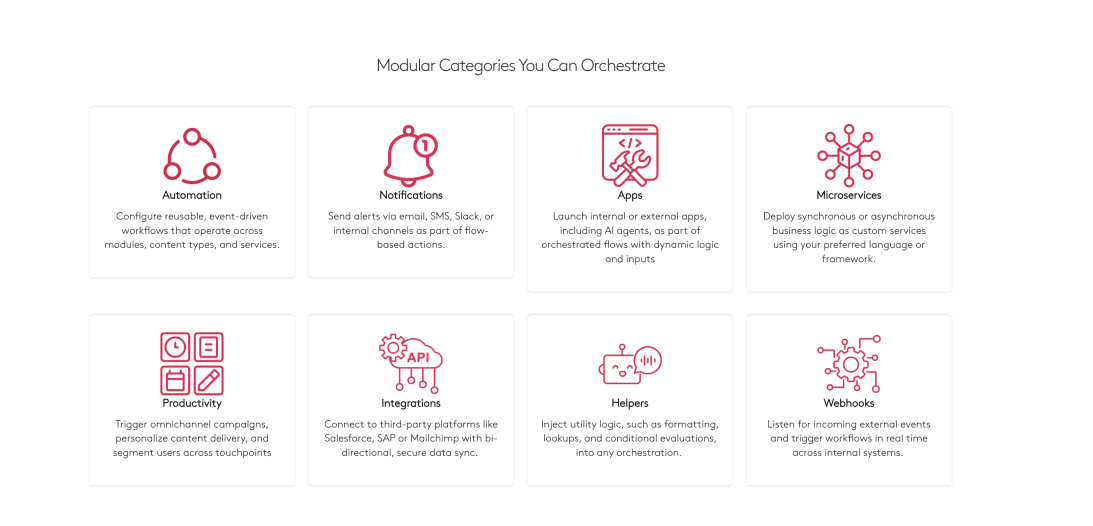
What “fluid” integration actually requires
To move from fragile to fluid, there are a few areas that really have to stay in sync:
- Pricing, including contract and volume logic
- Product data and category structure
- Customer profiles, credit limits, and terms
- Order status flowing back to the customer experience
Most teams do not need to boil the ocean on day one. What we usually recommend is starting with the inventory and order loop, because that is where customer trust is most exposed. From there, you expand into customer and pricing logic, and then into broader product data synchronization.
Done right, integration stops being a constant fire drill and starts behaving more like infrastructure you can actually rely on.
Principle #4: Workflow Orchestration
Built-in automation, microservices, and AI agents are starting to replace what used to require five or more separate SaaS tools. But in a lot of environments, teams are still duct-taping things together.
You’ve probably seen the stack.
Zapier handling automations.
A translation service sitting off to the side.
An SEO plugin layered in.
A CDP trying to keep customer data in sync.
Individually, each tool makes sense. The problem shows up when all of them have to work together, in real time, under real business pressure.
What orchestration is meant to do is consolidate those moving parts into rule-based workflows that are managed from one place, instead of being scattered across the stack.
Why orchestration actually reduces complexity
Every additional SaaS tool introduces more than just subscription cost. It adds another integration point, another potential failure mode, and another place where data can drift out of sync.
We see this pattern a lot. Order data flows through Zapier, then into the ERP. That triggers an email workflow somewhere else. Customer data is syncing through yet another system. On paper, it works.
But structurally, it is a fragile chain.
If one link slows down, changes its API, or fails quietly, the business feels it pretty quickly. That is where orchestration starts to matter.
Instead of relying on external stitching, the orchestration layer handles automation, data sync, and intelligent decisioning natively inside the platform. Fewer moving parts, fewer handoffs, and generally fewer surprises later.
What Orchestration Replaces
In most environments, orchestration ends up absorbing a number of tools that teams previously had to manage separately. The practical benefit is not just cost reduction. It is the removal of task limits, sync delays, and cross-vendor coordination that tends to slow teams down over time.
Traditional Tool | Orchestration | Key Benefit |
Zapier or Make automations | Native workflow engine | No monthly task limits |
Segment or other CDP | Built-in customer data sync | Real-time data flow |
Translation services | AI translation agent | Context-aware localization |
SEO tools like Yoast | SEO automation agent | Auto-generated schema |
DAM systems | CDN with sync workflows | Automatic optimization |
How Core dna approaches orchestration
With core dna, orchestration sits inside the platform rather than beside it.
Event-driven triggers fire automatically based on user behavior, data changes, or time-based schedules. Actions execute without someone having to manually kick off a process. That might be sending a personalized email, updating inventory across channels, or initiating fulfillment logic.
Conditional logic also plays a big role here. Workflows can branch based on real conditions, so express orders can follow a different path than standard ones, or international shipments can trigger the right customs flow automatically.
On the data side, transformation happens inside the orchestration layer. If your ERP and commerce platform use different product codes or formats, the system handles that mapping without requiring custom glue code.
There is also built-in resiliency. Retry logic, failure notifications, and audit logging are there so temporary API issues do not quietly break the business. And when something does need attention, teams can actually trace what happened.
How orchestration helps with order fulfillment
Order fulfillment is where orchestration becomes very tangible.
When a customer places an order, the system can check inventory across warehouses in real time. The orchestration layer routes the order to the optimal location based on availability and proximity. The selected warehouse ERP receives the order automatically. Shipping labels generate. The customer gets tracking. Inventory updates everywhere.
That workflow touches multiple systems, commerce, inventory, ERP, carrier, customer comms, but it does not require manual coordination between them.
And in most enterprise environments, that is the difference between a stack that technically works and one that actually scales without constant intervention.
Principle #5: Multi-Brand and Multi-Channel Management
No enterprise should be managing every new website as a fresh build. That’s honestly where things start to go sideways.
If your team has to spin up a new project every single time you launch a site, whether it’s a franchise location, a regional property, or a campaign microsite, the model just doesn’t hold up at scale. The resources alone make it painful.
A scalable digital setup should be built on components, structure, and reusable logic that can be multiplied as many times as the business needs. That’s really the point.
What scalable actually means in practice
When we talk about scalable multi-site from an enterprise point of view, it’s not just about “having many sites.”
It means you can manage multiple websites under one admin.
It means you have a clear hierarchy across the organization so roles and responsibilities are properly assigned.
It means corporate can decide how much independence local teams actually have versus how tightly brand needs to be controlled, fonts, look and feel, messaging, all of it.
And this isn’t just a franchise conversation.
This applies whether you are running franchises, managing one brand with multiple product lines, operating multiple sub-brands, or launching campaign landing pages on a regular basis.
The underlying requirement is the same. The system has to scale structurally, not just visually.
What breaks when every site is a new build
If an enterprise has to treat each site as a separate build, the cost shows up in a lot of places, and usually faster than teams expect.
You lose velocity because every launch becomes a mini project.You burn resources on repeat work that should have been reusable. You increase technical debt because environments start to drift apart. You introduce brand inconsistency because updates don’t propagate cleanly. You create upgrade risk because versions start to fragment. And maybe most importantly, you slow the business down at exactly the moment it is trying to expand.
None of that is theoretical. We see this pattern over and over again.
What enterprise platforms should already support
At this point, enterprise ecommerce platforms really should not be struggling with multi-site management. The capability exists. The real question is whether it is built into the core architecture or being forced through layers of workarounds.
From an enterprise perspective, the expectation is actually pretty straightforward. You should be able to manage multiple sites from a single administrative layer without spinning up new environments every time the business expands. There should be a clear organizational hierarchy so corporate, regional teams, and local operators each know exactly what they control and what they don’t.
At the same time, brand guardrails need to stay intact. Corporate should be able to protect the core brand experience while still allowing local teams enough flexibility to operate in their market. If every small change requires central intervention, the system slows down. But if everything is wide open, the brand starts to fragment. The platform has to support that balance natively.
When that foundation is in place, scaling to the next 10, 20, or 50 sites becomes operational. It feels repeatable. Without it, every new launch quietly turns into another custom project, and that is usually where teams start to feel the drag.
Principle #6: Hyper-Personalization and Agentic Commerce
The final frontier of enterprise eCommerce isn't just about showing the right product to the right person, it’s about moving from static segments to dynamic, AI-driven "Agentic Commerce." In an enterprise or B2B context, personalization isn't a "nice-to-have" marketing feature; it is a fundamental requirement for handling the complexity of modern buyer behavior.
Why Personalization is a necessity
In a retail environment, personalization might mean recommending a similar pair of shoes. In a complex enterprise environment, it means providing a private, authenticated portal where a legacy client sees only their negotiated contract pricing, their approved SKU list, and their specific credit terms. Without this, your digital channel is just a catalog, not a sales engine.
As we move toward Agentic Commerce, personalization evolves. It’s no longer just about what the user sees, but how the platform’s "AI agents" anticipate needs, automatically suggesting reorders based on past consumption or dynamically adjusting pricing based on real-time inventory and customer tiering.
The Z2H2 Framework for Personalization
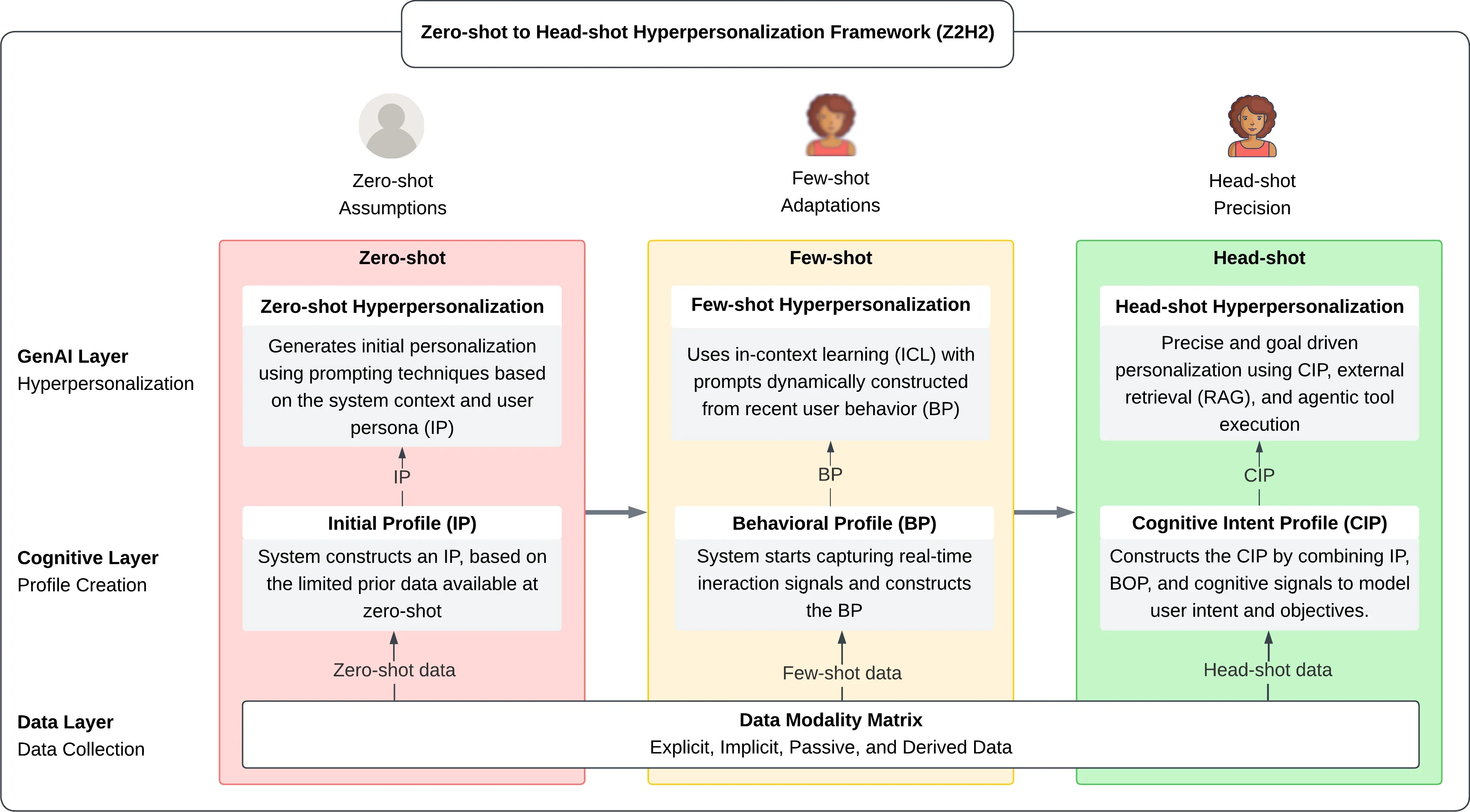
Our research along side LaTrobe University lead us to Z2H2 Framework for Personalization, Successful enterprise personalization follows a tiered approach to data and execution:
- Zero-shot: Delivering a high-quality experience to anonymous users based on intent and context.
- Few-shot: Using minimal interaction data to refine the experience in real-time.
- Head-shot (Hyper-personalization): Leveraging deep integration with your CRM and ERP to provide a 1:1 experience for authenticated users, including specific Request-for-Quote (RFQ) workflows and custom kit-based views.
Implementation Pattern
The path to hyper-personalization begins by unifying your data sources. If your customer data is siloed in your CRM and your pricing is stuck in your ERP, your commerce platform is flying blind. You must establish a "single source of truth" where the commerce engine can pull real-time data to drive the UI.
Once integrated, deploy AI-driven orchestration. Instead of manually building thousands of segments, use AI agents to analyze behavior and automate the "next best action"—whether that’s triggering a discount for a slipping account or surfacing a technical whitepaper for a user researching complex machinery.
Summarize with