Multi-site management is running many websites and online stores from one platform: you set the brand, the shared content and the rules once, and each site changes only what it owns. The sites can be brands in a portfolio, country sites, franchise or branch locations, program microsites, or a B2B portal next to a consumer store. For the full definition, see our multisite management glossary entry.
Nobody launches with a multi-site setup. Most organisations start with workarounds that meet the immediate need: a new market needs its own site, an acquisition comes with its own platform, franchisees build their own pages and the B2B team asks for a trade portal.
A few years later, a price change takes a week, a security patch means 30 deployments, and nobody can tell you how all the sites performed last month without exporting data from each one. That's usually when teams look at the bigger picture and start planning a structured multi-site setup.
Below, you'll find why multi-site setups break down, six strategies that keep them under control, how to choose between the main setups, what to ask each vendor, and how to move your existing sites onto one platform.

Why do organisations end up running so many websites?
Most multi-site estates grow one reasonable decision at a time:
- New markets. Each country needs its own language, currency, tax rules and legal pages, so it gets its own site.
- Acquisitions. A brand you buy arrives with its own website, platform and agency.
- Locations. Franchise networks, branch networks and councils end up with a site or a page for every store, branch, library or leisure centre.
- New audiences. Trade customers need a B2B portal with their own prices, members need a portal, and campaigns need microsites.
- Local teams. Without a central option, regional teams and franchisees build their own.
None of these is a mistake. The trouble starts when every new site is built as a separate project, on whatever platform the team picked at the time.
How do most multi-site strategies fail?
They fail on the work that comes after launch. Each site has its own resources, so your developers and marketers maintain the same things many times over:
- Duplicated content drifts. The same product description, policy or promotion lives in 20 places, and some of them are always out of date.
- Stock and prices disagree. If two stores sell the same products from the same warehouse but run on separate systems, you keep two inventories in step by hand. When they drift, one store sells stock you don't have.
- Platforms age at different speeds. One site is on the latest version, another is three versions behind, and a third runs on a platform that's reaching end of life.
- Security becomes a checklist. Every patch has to be applied, tested and deployed site by site.
- Nobody sees the whole picture. Reports live in separate accounts, so comparing sites means spreadsheets.
The result is a poor experience for your customers and your staff, and a digital team that spends most of its time on upkeep.
6 multi-site management strategies that work
Each strategy fixes one of the problems above. Start with the first, because it decides how you set up the other five:
- Decide what head office owns and what each site owns
- Run every site on one codebase and one content model
- Keep one user database, with permissions per site
- Sell from one catalogue and one stock pool
- Report across every site from one place
- Let AI agents handle repeat updates, through the same approvals
1. Decide what head office owns and what each site owns
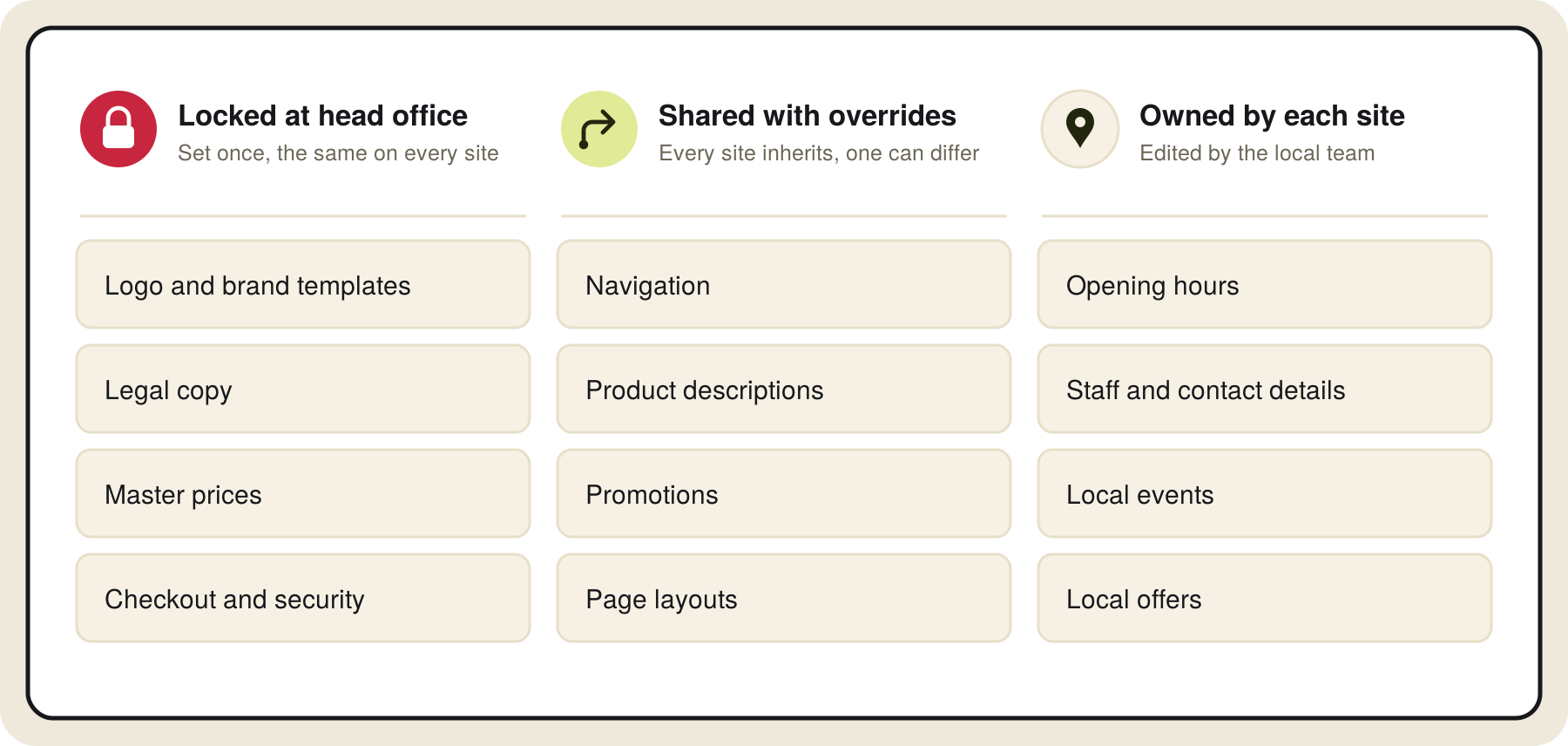
Before you look at platforms, agree who owns what. Most organisations end up with three groups:
- Locked at head office: logo, brand templates, legal copy, master prices, checkout and security settings.
- Shared, with local overrides: navigation, product descriptions, promotions and page layouts. Every site inherits them, and a site can replace one part when it needs to.
- Owned locally: opening hours, staff, local events, local offers and contact details.
Write this down per content type and per group of sites. It becomes your permission model, your approval rules and your platform requirements in one document. A franchise network will lock more at head office than a group of independent brands, and a country site needs more local control over prices and legal pages than a store page does.
2. Run every site on one codebase and one content model
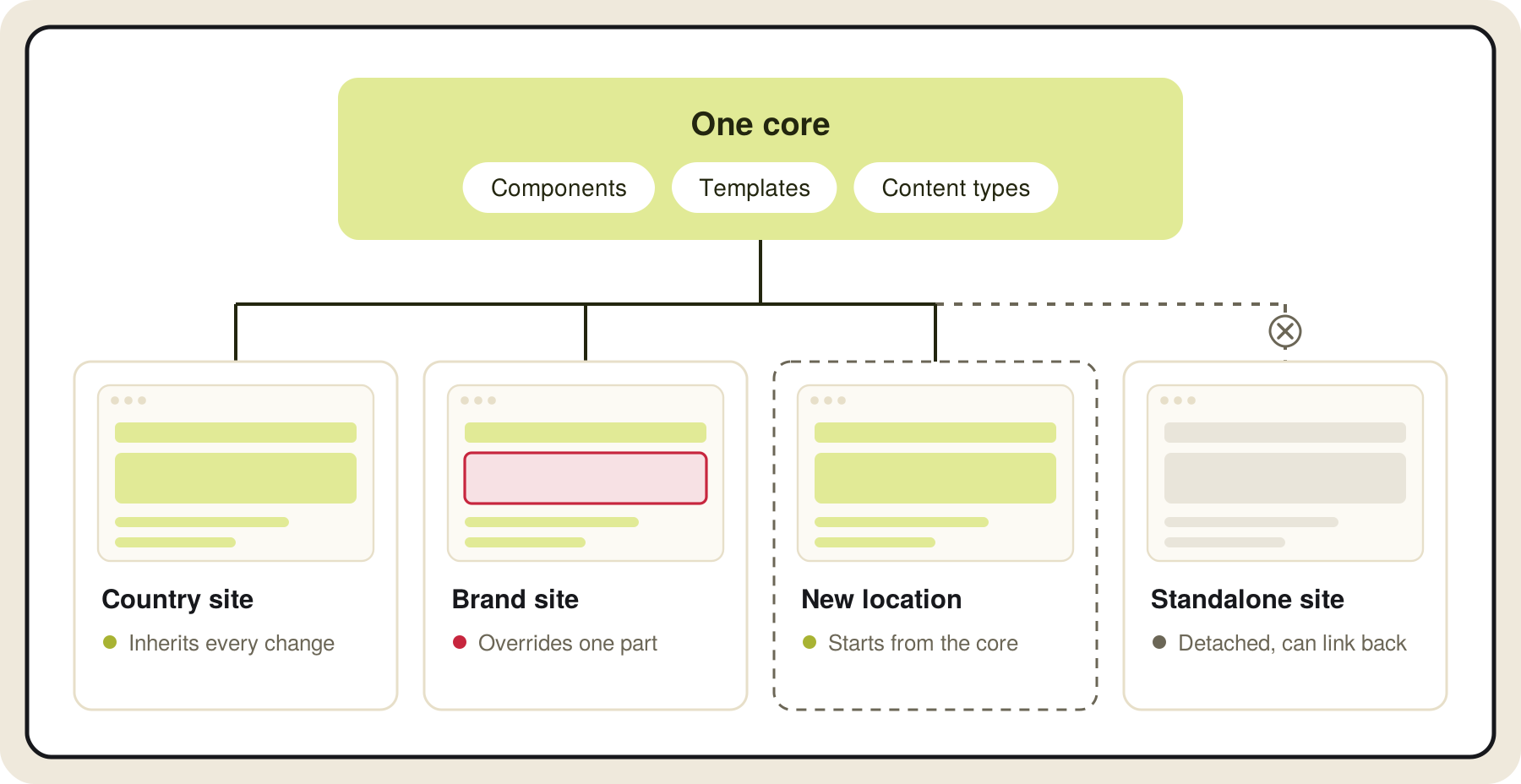
If each site has its own templates, a design change becomes a project per site. Put every site on the same components, templates and content types, and set them up once at the core. A change at the core reaches every site that inherits it, and a site that needs to differ overrides that one part without being copied off the core.
The same structure makes new sites quick to launch. A new country, brand or location starts from the core, takes what it shares and adds only what's local. On Core dna, you can also detach a site completely when it needs to stand on its own, and link it back later. See how inheritance works across sites.
3. Keep one user database, with permissions per site
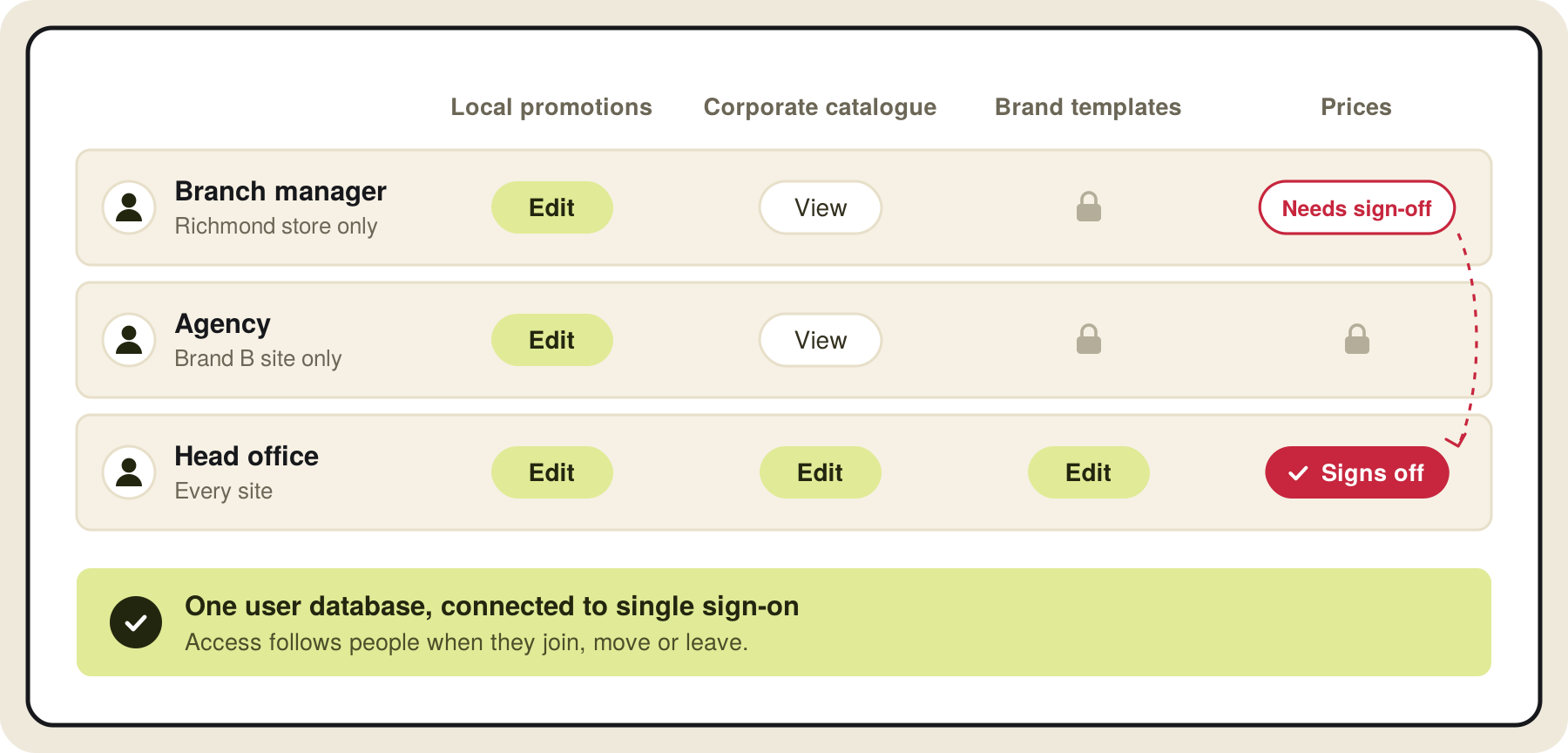
Content creators, editors, local managers, agencies and administrators all need access, but rarely to every site. If each site has its own user database, you manage the same people in many places and remove leavers one site at a time.
Use one user database and assign roles per site and per content type. A branch manager can edit local promotions, view the corporate catalogue and have no access to brand templates. Add approval steps for the changes that matter, such as prices, legal pages or anything shared across sites, so head office signs off before they go live. Connect it to your single sign-on so access follows people when they join, move or leave.
YMCA of Greater Toronto works this way: each program team signs in to the same admin and can only edit its own microsite, while the digital team looks after the shared parts.
4. Sell from one catalogue and one stock pool
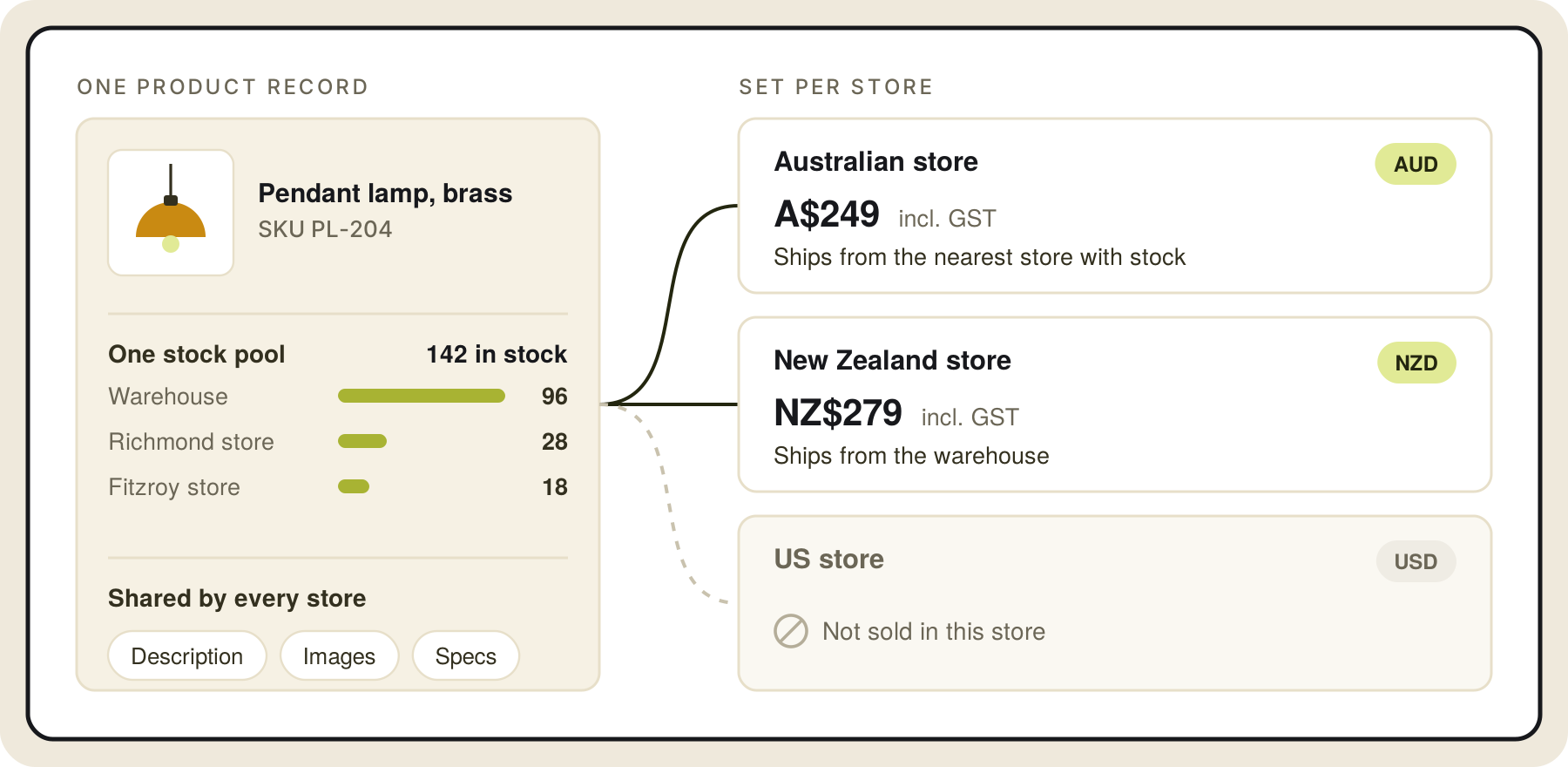
For online stores, separate systems mean separate catalogues and separate inventories. Keep one product catalogue and one view of stock, and set what changes per store: price, currency, tax, payment methods, shipping rules and which products each store sells. Our guide to running several stores from one platform covers this in more detail.
If you also have physical locations, stock by store matters too. Clark Rubber runs one online store for 70+ franchise stores, with stock shown by store and every order traced to the store that fills it (see the case studies below).
5. Report across every site from one place
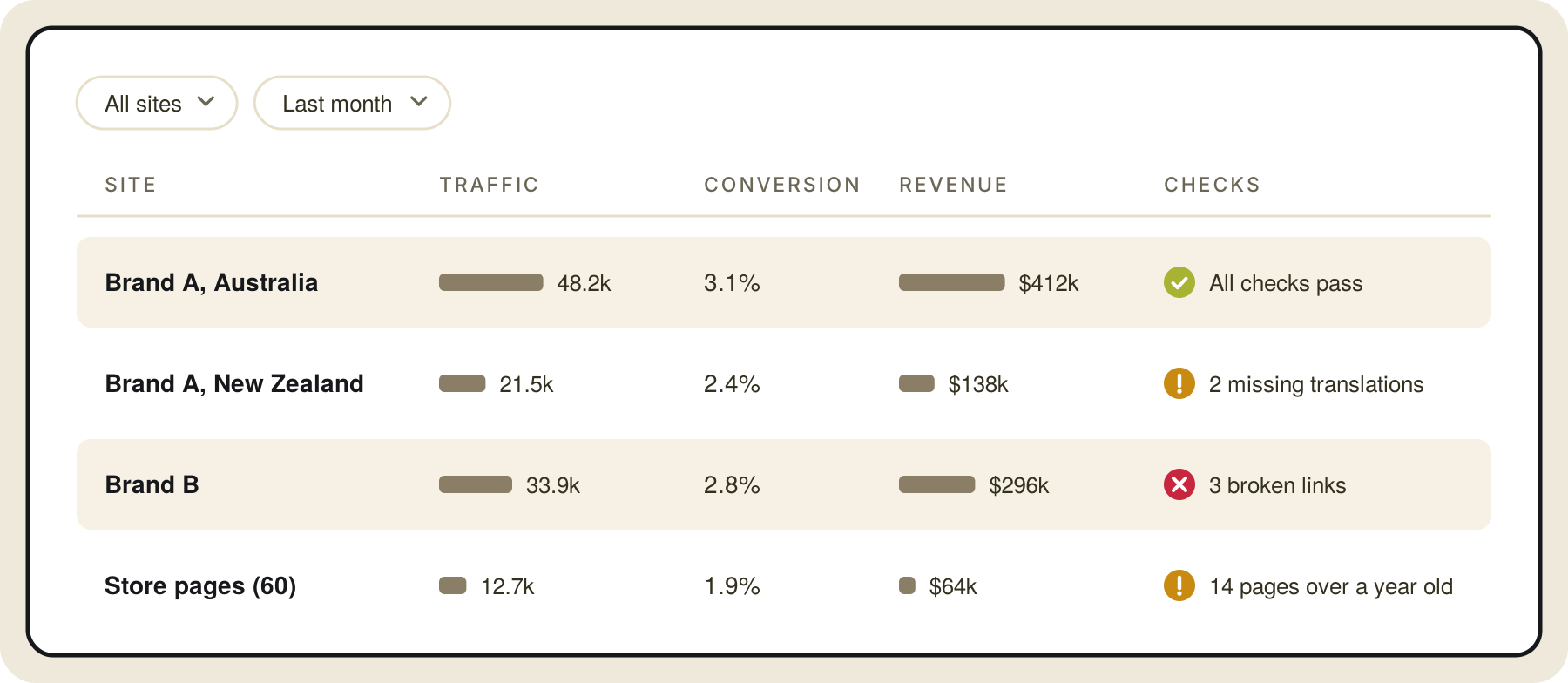
Set up analytics the same way on every site, with the same events and naming, so the numbers compare.
In Google Analytics 4, you can give each site its own property or track related sites in one property with a data stream each. If visitors move between your domains, for example from a brand site to a shared checkout, set up cross-domain measurement in the data stream settings so the visit counts as one session. Roll-up properties, which combine several properties into one view, are only available in Google Analytics 360.
Then build one dashboard that shows every site side by side: traffic, conversion, revenue and content freshness. Add operational checks too, such as broken links, missing translations and pages nobody has updated in a year.
6. Let AI agents handle repeat updates, through the same approvals
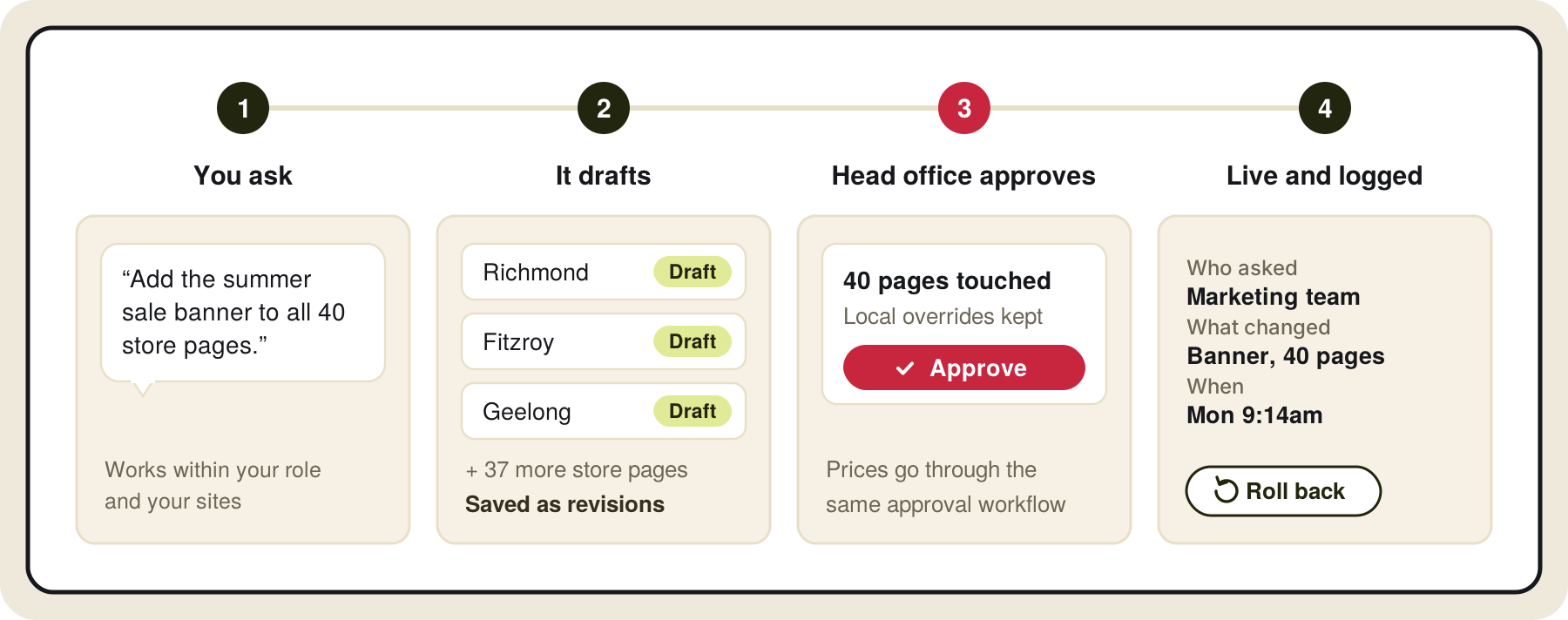
Much of multi-site work is the same change made many times: a new banner on 40 store pages, a price update across three brands, a translated page for every market. AI agents can take this on, as long as they work inside your rules.
On Core dna, you can connect an AI assistant such as Claude or ChatGPT to your sites through the MCP server. The agent works within the role and sites of the person using it, saves every change as a revision, and shows which sites a change touches before anyone approves it. Product and price changes go through the same approval workflow as content. Every action is logged and can be rolled back, and access is off by default and turned on per user. Save a Life, for example, is translating its website this way. Read more about connecting Core dna to AI agents.
Separate installs, multisite or one shared platform: which setup fits?
There are three common ways to run many sites. They differ in what the sites share.
| Separate installs | Multisite on one install | One platform with a shared core | |
|---|---|---|---|
| What the sites share | Nothing | Code, themes, plugins and users; content stays separate per site | Components, templates, content, catalogue, users and settings, with local overrides |
| Updating every site | Site by site | Code once; content site by site | Once at the core, inherited by every site |
| Local control | Full | Limited by the shared theme and plugins | Set per site and per field |
| Selling across sites | Separate stores and stock | Depends on plugins | One catalogue and stock, with prices per store |
| Examples | A WordPress site or Shopify store per brand | WordPress Multisite, Drupal multisite | Core dna, Adobe Experience Manager with Multi Site Manager |
Separate installs give each team full freedom and leave you with the most upkeep. Multisite on one install cuts the code upkeep, but content, stock and reporting usually stay separate. A shared core takes more planning up front, because you need the ownership model from strategy 1, and it's the setup where a change at head office reaches every site without being repeated.
You may also hear the term multi-tenant. It usually means independent operators, such as franchisees or dealers, each with their own data and logins on shared infrastructure. Many networks need both: a shared core for the brand and separate spaces for each operator.
See one change at head office reach every site, with local overrides and approvals.
What should you look for in a multi-site management platform?
Test every platform against the way you run your sites. Ask each vendor to show you, in a demo built on your own structure:
- A change made once at head office and inherited by 20 sites, with one site overriding it.
- A local manager who can edit their own site and nothing else.
- An approval step on a price or legal change.
- A new site launched from the core, and how long it took.
- One catalogue sold on two stores with different prices, currency and tax.
- A report that compares every site.
- An AI agent making a change across several sites, and the audit trail it leaves.
The platforms most often shortlisted for large multi-site estates include Adobe Experience Manager, Sitecore, Optimizely, Contentful, Drupal with Acquia, WordPress Multisite and Core dna. We compare them in our list of the 10 best enterprise CMS and our guide to multisite CMS platforms. If you run a franchise network, see the best franchise website platforms.
How do you move many websites onto one platform?
Moving dozens of sites at once is where most consolidation projects stall. Move them in waves:
- List every site. Note traffic, revenue, owner, platform, contract end date and integrations. You'll usually find sites nobody uses.
- Retire or merge first. Fold low-traffic sites into a parent site as sections or location pages, with redirects.
- Build the core. Agree the ownership model, then build the shared components, templates and content types once.
- Move a pilot group. Pick three to five sites that represent the estate, such as one brand, one country and one location, and launch them on the core.
- Move the rest in waves. Group sites by template and market, migrate content, map redirects and check every old URL so you keep your search rankings.
- Switch off the old platforms. Do this once the last site has moved, so you stop paying for two.
Keep every address working while you move. YMCA of Greater Toronto launched its sites in groups, and while some microsites were still on the old platform, their new addresses on the main domain sent visitors through to the old servers until each group went live.
Line the waves up with your platform contract end dates. If one of your platforms is reaching end of life, start with the sites that run on it. Our guide to website replatforming covers the migration steps in more detail.
Multi-site management case studies: YMCA of Greater Toronto and Clark Rubber
Here's how two organisations run many sites on Core dna.
YMCA of Greater Toronto
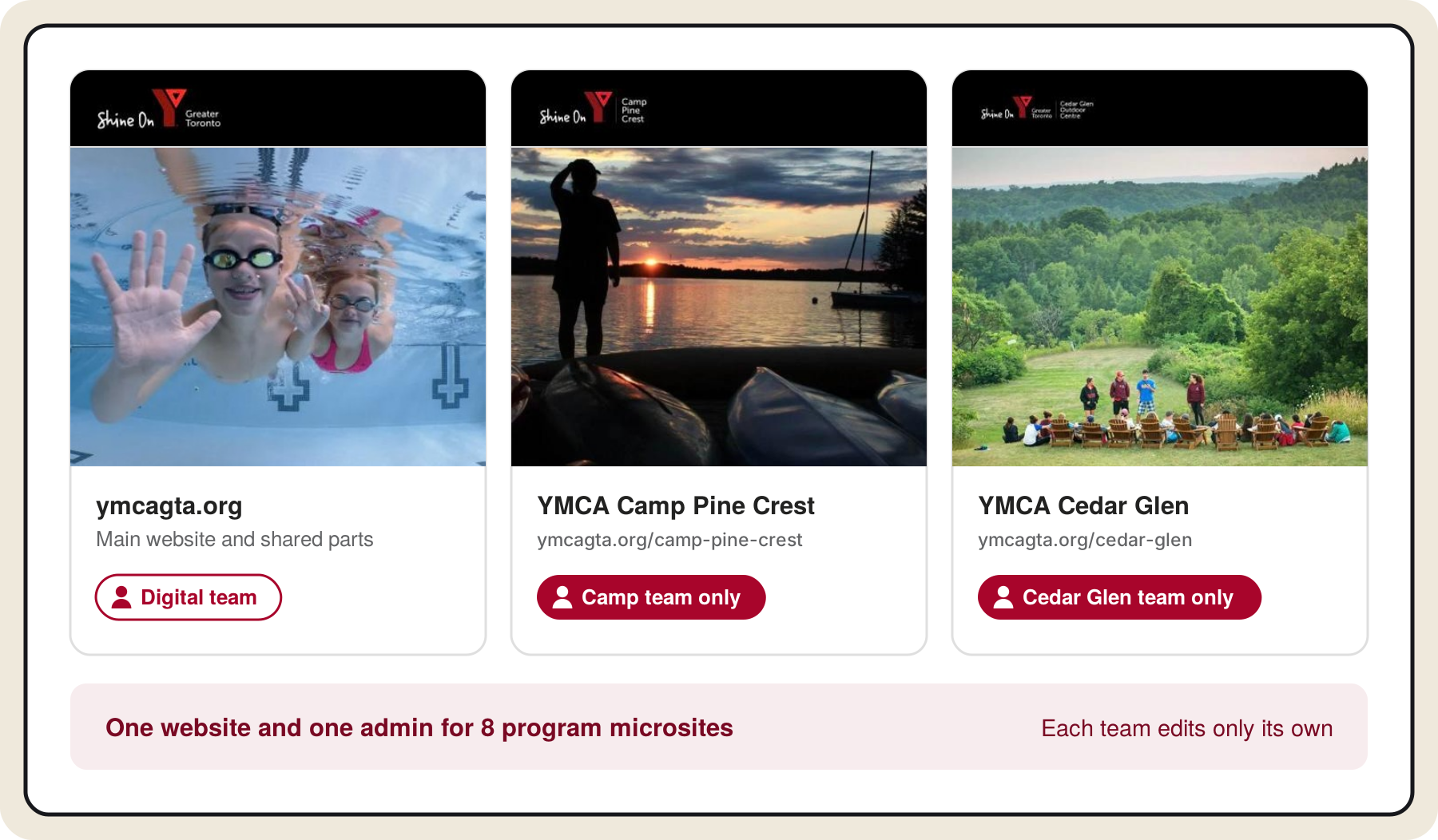
YMCA of Greater Toronto runs its main website, the Y Guide, the Ignite learning platform and 8 branded program microsites on one Core dna setup: about 2,300 pages in English and French, including 498 Find a Y location pages. It moved off an ASP.NET and Sitecore build its team couldn't change without outside help, folded its microsites into ymcagta.org as sections, and gave each program team access to its own microsite only. Online registrations reached a record 8,000 in a single day, up from 1,500. Read how YMCA GTA runs 498 locations from one website.
Clark Rubber
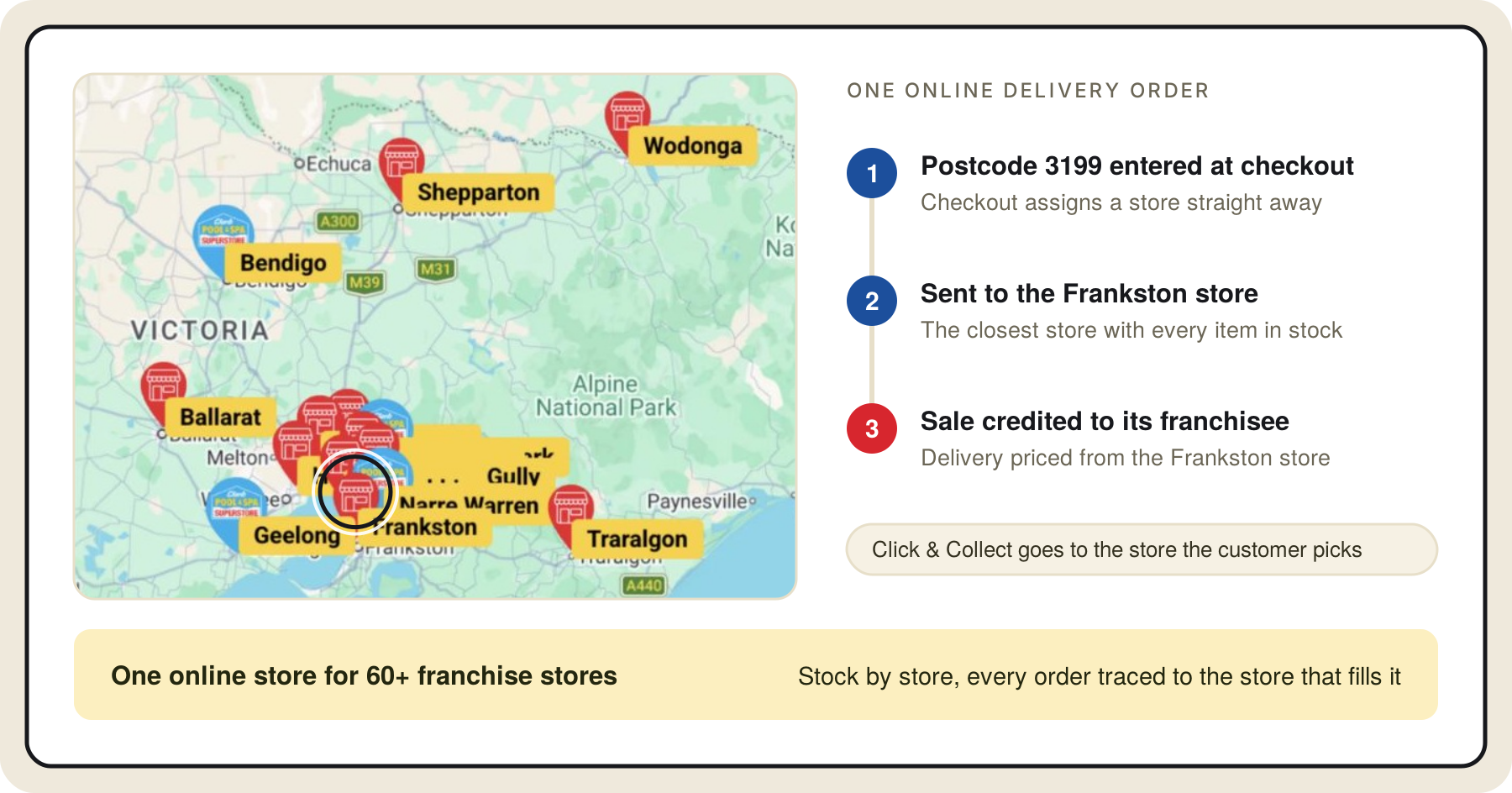
Clark Rubber is an Australian franchise retailer of pool, rubber, foam and cleaning products with 70+ stores. It moved its franchise ecommerce from Shopify Plus to Core dna in 2022. Each store has its own page built from one template, every product page shows stock by store, delivery orders go to the closest store that can fill the whole cart, and each sale is credited to the franchisee whose store fills it. Read how Clark Rubber manages stock across 70+ franchise stores.
Will your setup still work at 50 sites?
Think about where your estate will be in three years: more markets, more brands, more locations, and more AI tools working on your content. Will your setup still work at 50 sites? At 500 location pages?
This is our take.
Start with ownership. Most of the multi-site problems we see come from nobody agreeing what head office controls and what each site controls, so every team builds its own version. Once that's agreed, the platform's job is to enforce it: one core every site inherits from, local overrides where you allow them, approvals where you need them, and one place to see everything.
Look hard at how long your platform will stay supported in its current form, too. Moving 50 sites is a large project, and you don't want to repeat it because a vendor ends support. On Core dna, every customer runs on the same codebase and gets updates continuously, so you don't face a forced replatform. See how you manage every site, store and location from one place.
Summarize with